EXPLAINER · CHECKED 21 NOVEMBER 2026
A ZATCA Phase 2 QR code holds 9 fields: seller name, VAT number, date and time, total with VAT, VAT amount, invoice hash, digital signature, public key and certificate signature.
Each field is TLV-encoded (tag, length, value), all fields are joined and base64-encoded, and that text becomes the QR image. Below we decode a real Phase 2 QR from our live demo, byte by byte, and list the mistakes that make ZATCA flag it.
If you run a shop, a restaurant or a SaaS product in Saudi Arabia, the QR code on your invoice is the part customers and inspectors actually see. At iFynx we built a ZATCA Phase 2 invoice demo and tested it against ZATCA’s sandbox, so this guide uses a real decoded QR, not a diagram from memory.
What is inside a ZATCA QR code?
Here is the QR from a demo invoice of 71.75 SAR (two items, 15% VAT), decoded. Fields 1 to 5 are the Phase 1 fields; fields 6 to 9 arrive with Phase 2 integration.
| Tag | Field | What it must contain | Our example |
|---|---|---|---|
| 1 | Seller name | The seller’s registered name, as in the invoice XML. | iFynx Demo Store (16 bytes) |
| 2 | VAT registration number | 15 digits, starting and ending with 3. | 399999999900003 (15 bytes) |
| 3 | Invoice date and time | Must match IssueDate and IssueTime in the XML exactly. | 2026-11-21T10:15:00 (19 bytes) |
| 4 | Invoice total with VAT | Same value as TaxInclusiveAmount in the XML. | 71.75 (5 bytes) |
| 5 | VAT total | Same value as the invoice’s VAT amount in the XML. | 9.36 (4 bytes) |
| 6 | Invoice hash | SHA-256 of the canonical invoice XML, base64. | 44 characters |
| 7 | Digital signature | ECDSA signature of the invoice hash, base64. | 96 characters in our test |
| 8 | Public key | The signing device’s public key (from its certificate). | 88 bytes |
| 9 | Certificate signature | ZATCA’s signature on the device certificate. Used on simplified invoices. | 72 bytes in our test |
Total: 377 bytes, which is 504 characters of base64 inside the QR image.
How is the QR encoded? (TLV in one picture)
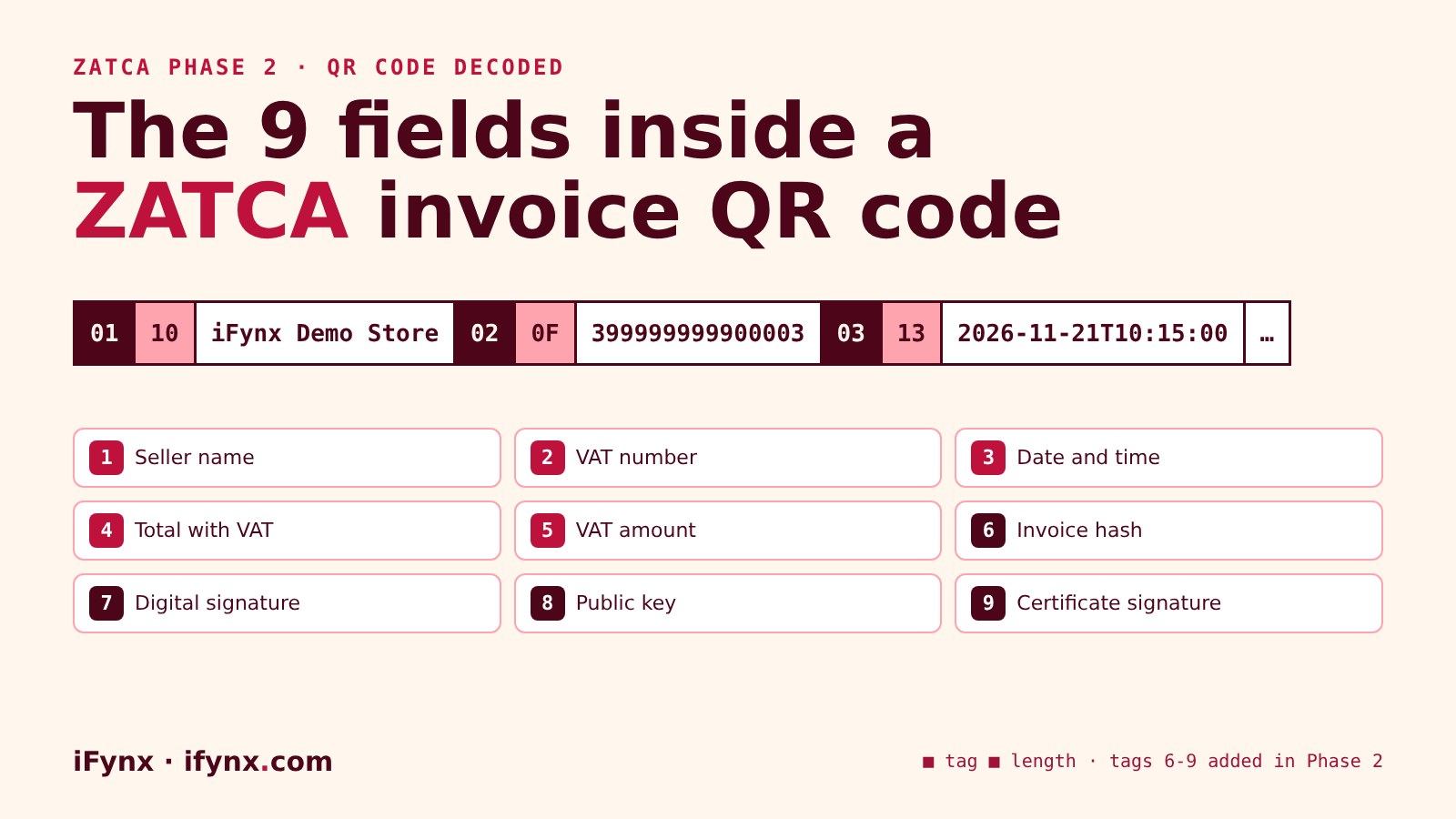
TLV stands for tag, length, value. Each field starts with one byte for its tag number, then one byte for the length of the value in bytes, then the value itself. The strip below is the start of our QR in hexadecimal:
01 = tag 1 (seller name), 10 = 16 bytes long, then the name. 02 = tag 2, 0F = 15 bytes, then the VAT number. 03 = tag 3, 13 = 19 bytes, then the timestamp. After all nine fields, the bytes are base64-encoded.
Because the length is a single byte, a field can be at most 255 bytes. That matters for long Arabic seller names, since each Arabic letter takes two bytes.
What changed between Phase 1 and Phase 2?
Phase 1 (generation) began on 4 December 2021 and required a QR with the five readable fields. Phase 2 (integration) is rolled out to taxpayers in waves; Wave 25 covers VAT-subject revenue above SAR 187,500 in any year from 2022 to 2025, with integration due by 1 February 2027 (ZATCA). After integration, your system signs each invoice, and the QR carries the hash, the signature, the public key and the certificate signature, so anyone can check that the invoice was not changed after it was issued.
Common QR mistakes (and the warning we hit)
Check these before go-live
invoiceTimeStamp_QRCODE_INVALID): our QR value had an extra Z. Build tag 3 from IssueDate and IssueTime.71.75, the QR should say 71.75, not 71.750 or SAR 71.75. Take tags 4 and 5 from the final XML values.How do I check an invoice QR code?
Scan it with any QR reader and you get base64 text. Decode the base64 into bytes and read the TLV fields: the first five should match the printed invoice exactly. For the signed fields, the reliable check is ZATCA’s own validation, which your integrated system receives for every invoice it reports or clears. To see the decoding live, issue an invoice in the iFynx demo: it prints the nine fields next to the QR.
How iFynx can help
iFynx connects POS, ERP, e-commerce and custom apps to ZATCA Fatoora, including correct Phase 2 QR codes on screen and on receipt printers.
- QR generation from the final signed XML, in Arabic and English, tested on real printers.
- Fatoora onboarding, signing, reporting and clearance, with monitoring for warnings.
- Sandbox testing with your real invoices before go-live.
Try the live demo · Talk to iFynx · Estimate your project cost
Frequently asked questions
How many fields are in a ZATCA QR code?
Phase 1 QR codes have 5 fields: seller name, VAT number, date and time, total with VAT and VAT amount. Phase 2 adds 4 more: invoice hash, digital signature, public key and the certificate signature, for 9 in total on simplified invoices.
What format is the ZATCA QR code?
Each field is written as TLV: one byte for the tag number, one byte for the length in bytes, then the value. All fields are joined and the result is encoded in base64. That base64 text is what the QR image contains.
Why does my QR scan show random letters?
Because the QR holds base64 text, not plain words. Decode the base64, then read the TLV fields one by one. Our live demo shows the decoded fields next to the QR.
Does the QR timestamp need a time zone?
It must match the invoice’s IssueDate and IssueTime exactly as written in the XML. In our sandbox test, adding a Z only to the QR value produced the invoiceTimeStamp_QRCODE_INVALID warning.
Can I generate the QR without integrating with Fatoora?
Phase 1 QR codes (5 fields) need no integration. Phase 2 fields 6 to 9 need a signing key and a certificate issued through Fatoora onboarding, so they come with integration.
Where can I see a Phase 2 QR code being built?
Try the iFynx live ZATCA Phase 2 demo: issue an invoice and it shows the QR and all nine decoded fields, built in your browser.
Related reading
- We tested ZATCA Phase 2 invoices on Fatoora’s sandbox: what PASS, WARNING and ERROR mean
- ZATCA Wave 25: what product and engineering teams must ship before 1 February 2027
Checked at 21 November 2026. Example decoded from an invoice issued by the iFynx demo engine (sandbox certificate). Sources: ZATCA Wave 25 announcement; our sandbox test logs.
Every Sunday: the most serious confirmed CVEs and breaches, who is exposed in Saudi Arabia, the UAE and Egypt, and what to patch first. Free, in English and Arabic, one-click unsubscribe.
✓ You’re subscribed. A welcome email is on its way; the first issue arrives on Sunday.