STEP-BY-STEP · CHECKED 21 NOVEMBER 2026
Onboarding a device to ZATCA Fatoora takes 7 steps: create a key, build a CSR, get a 1-hour OTP from the Fatoora portal, request a compliance CSID, pass the compliance checks, request the production CSID, then go live.
Each POS, ERP or app instance that issues invoices (an EGS unit) is onboarded on its own. We ran this flow end to end on ZATCA’s sandbox for our live Phase 2 demo; here is the order, the fields that matter and the mistakes that cost teams days.
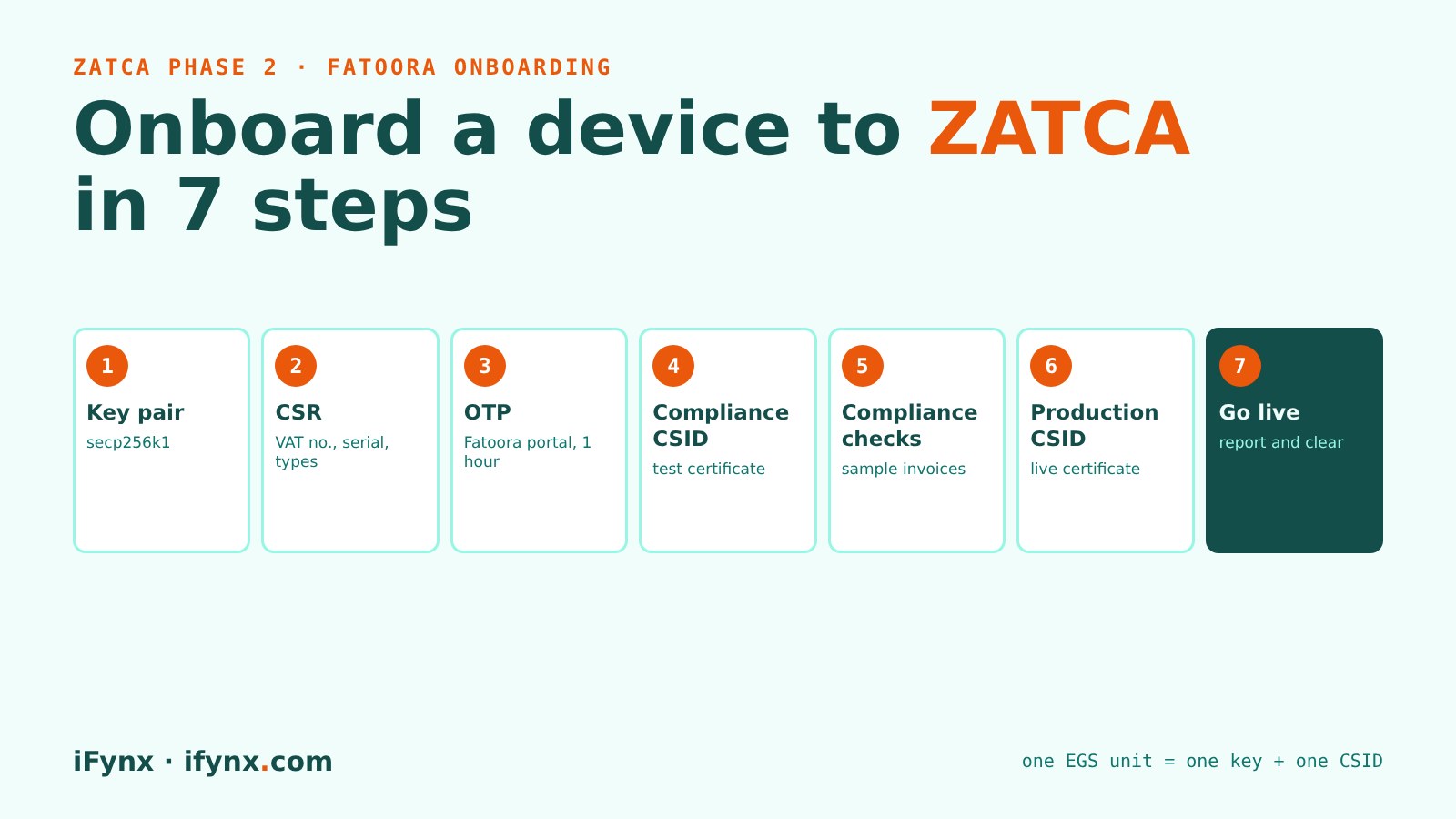
Integration with Fatoora sounds heavy, but most of it is one careful setup per device, done once. At iFynx we built a working ZATCA Phase 2 demo and passed ZATCA’s sandbox checks, so this guide follows what actually happened, not a brochure.
Three environments, three template names
ZATCA gives you three places to onboard. Start in the sandbox, rehearse in simulation, then go to production. The template name inside the CSR tells ZATCA which one you mean.
| Environment | Who it is for | Where the OTP comes from | CSR template |
|---|---|---|---|
| Sandbox (Developer Portal) | Developers testing code | Fixed test OTP (123345 in our tests) | TSTZATCA-Code-Signing |
| Simulation | Rehearsal with your real VAT number | From the Fatoora Simulation portal | PREZATCA-Code-Signing |
| Production | Live invoices | From the Fatoora portal, valid 1 hour | ZATCA-Code-Signing |
The 7 onboarding steps
From a new device to live invoices
1-solution|2-model|3-serial, your 15-digit VAT number, the invoice types the unit will issue (the 4-digit title, for example 1100 for standard and simplified), your address and business category, and the template name for the environment (table above).What a CSR looks like
This is the configuration behind the sandbox certificate in our demo. In production you change the template name, the VAT number and the serial number; the shape stays the same.
# csr.cnf (sandbox example, the one our demo uses)
[req_ext]
1.3.6.1.4.1.311.20.2 = ASN1:PRINTABLESTRING:TSTZATCA-Code-Signing
subjectAltName = dirName:dir_sect
[dir_sect]
SN = 1-iFynx|2-WebDemo|3-ed22f1d8-...   # solution | model | unit serial
UID = 399999999900003                    # VAT registration number
title = 0100                             # invoice types this unit issues
registeredAddress = Gaza
businessCategory = Software

openssl ecparam -name secp256k1 -genkey -noout -out key.pem
openssl req -new -sha256 -key key.pem -config csr.cnf -out unit.csr
Once the unit has its production CSID, every invoice is signed, hashed and chained to the one before it, and the QR code gains four extra fields. We decoded a real one in The 9 fields of a ZATCA QR code.
Mistakes that slow onboarding down
Check these before you generate OTPs
Managing units after go-live
The Fatoora portal lists your onboarded solutions and devices, and lets you renew a unit’s CSID with a new OTP or revoke a unit you no longer use (Fatoora Portal User Manual). Keep an inventory of units, their serial numbers and where their keys live, so that replacing a till is a routine task and not an emergency.
How iFynx can help
iFynx connects POS, ERP, e-commerce and custom apps to ZATCA Fatoora, and handles onboarding for every unit.
- Key generation, CSR and onboarding scripts for each environment.
- Compliance checks with your real invoice samples, before the deadline.
- Monitoring, renewal and revocation as your branches and devices change.
Try the live demo · Talk to iFynx · Estimate your project cost
Frequently asked questions
What is a CSID in ZATCA?
CSID stands for Cryptographic Stamp Identifier. It is the certificate ZATCA issues to one EGS unit so it can sign invoices. There is a compliance CSID for testing and a production CSID for live invoices.
How long is the Fatoora OTP valid?
One hour from when it is generated, according to ZATCA’s Fatoora Portal User Manual.
Do I need a separate CSID for each POS terminal?
Yes. Each EGS unit is onboarded on its own, with its own key, OTP and CSID.
Can I test onboarding without a real VAT number?
Yes, in the Developer Portal sandbox, with the test VAT number 399999999900003. That is how our live demo certificate was issued. Simulation uses your real VAT number.
What happens if I revoke a unit?
Its CSID stops working and the unit can no longer issue valid invoices. Revocation is not reversible; the device can only be onboarded again as a new unit.
Who has to do this, and by when?
Every taxpayer called in a Phase 2 wave. Wave 25 covers VAT-subject revenue above SAR 187,500 in any year from 2022 to 2025, with integration due by 1 February 2027 (ZATCA).
Related reading
- We tested ZATCA Phase 2 invoices on Fatoora’s sandbox: what PASS, WARNING and ERROR mean
- ZATCA QR code explained: the 9 fields of a Phase 2 invoice QR
- ZATCA Wave 25: what product and engineering teams must ship before 1 February 2027
Checked at 21 November 2026. Sources: ZATCA Fatoora Portal User Manual; ZATCA E-invoicing Detailed Technical Guideline; ZATCA Wave 25 announcement; our own sandbox onboarding.
Every Sunday: the most serious confirmed CVEs and breaches, who is exposed in Saudi Arabia, the UAE and Egypt, and what to patch first. Free, in English and Arabic, one-click unsubscribe.
✓ You’re subscribed. A welcome email is on its way; the first issue arrives on Sunday.