Update, 10 November 2026, 22:07 Asia/Gaza
Related: Microsoft's November 2026 Patch Tuesday fixes an exploited Outlook zero-day, CVE-2026-124194: see Outlook Zero-Day CVE-2026-124194: November 2026 Patch Tuesday and What to Patch First in Gulf and Egypt Companies.
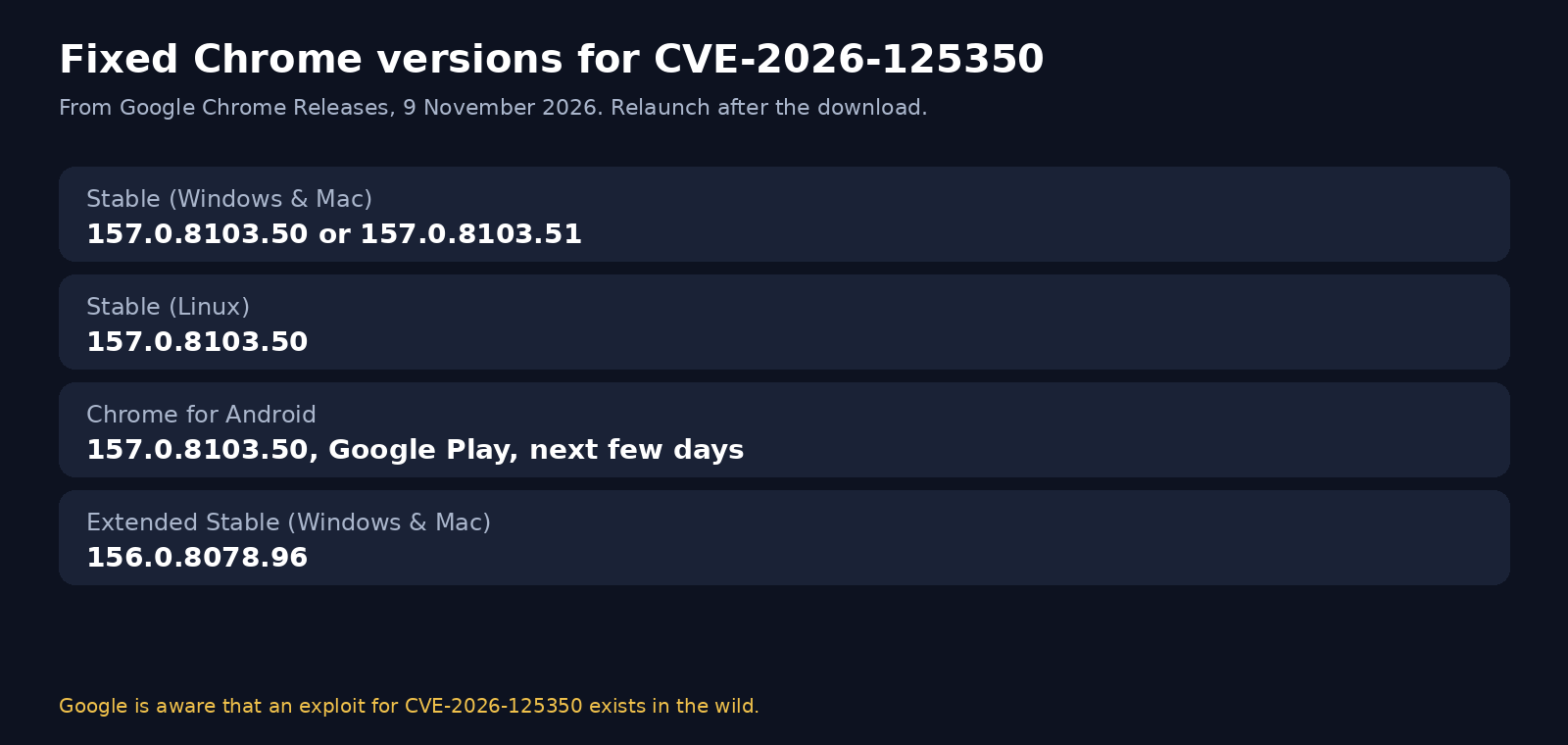
Direct answer — 10 November 2026: Google published a Stable Channel Update for Desktop on Monday 9 November 2026. The Stable channel is updated to 157.0.8103.50/.51 for Windows and Mac, and to 157.0.8103.50 for Linux, with a rollout over the coming days and weeks. The same day’s Chrome for Android post says Chrome 157 (157.0.8103.50) will become available on Google Play over the next few days, and that Android releases contain the same security fixes as the corresponding desktop releases (Windows and Mac: 157.0.8103.50/.51; Linux: 157.0.8103.50) unless otherwise noted. Extended Stable is updated to 156.0.8078.96 for Windows and Mac. The desktop Stable release includes nine security fixes. Among them is High CVE-2026-125350, a use-after-free in XML, reported by an anonymous researcher on 6 November 2026. Google’s wording is direct: “Google is aware that an exploit for CVE-2026-125350 exists in the wild.” iFynx is publishing this bilingual briefing so teams in the Gulf and Egypt can treat this as a Chrome zero-day, update Google Chrome, confirm the version after a relaunch, and push the fix across a company fleet instead of waiting for a quiet background download.


SecurityWeek and The Hacker News, listing earlier 2026 Chrome zero-days (CVE-2026-2441, CVE-2026-3909, CVE-2026-3910, CVE-2026-5281, CVE-2026-11645, CVE-2026-85046 and CVE-2026-87491), described this fix as the eighth Chrome zero-day of 2026. That count is theirs, not a figure Google published in the 9 November notes. We checked CISA’s Known Exploited Vulnerabilities catalog on 10 November 2026; CVE-2026-125350 was not listed at that time.
Microsoft’s Edge security release notes dated 9 November 2026 say: “Microsoft is aware of the recent exploits existing in the wild. We are actively working on releasing a security fix.” Do not treat the Edge 157.0.4341.42 builds published on 5 November (desktop Stable) and 9 November (Android and iOS) as this Chrome fix. Those notes sit alongside a still-pending Edge patch for the in-the-wild issue. Brave, Opera, Vivaldi and other Chromium browsers need their own vendor builds too.
The versions that close CVE-2026-125350
Use the numbers from Google’s 9 November Chrome Releases posts, and relaunch the browser so the new build is actually running:
| Channel | Platforms | Fixed version |
|---|---|---|
| Stable | Windows and Mac | 157.0.8103.50 or 157.0.8103.51 |
| Stable | Linux | 157.0.8103.50 |
| Chrome for Android | Android, via Google Play | 157.0.8103.50 (rolling out over the next few days from 9 November) |
| Extended Stable | Windows and Mac | 156.0.8078.96 |
Google also notes that access to bug details and links may be kept restricted until a majority of users are updated, or if the bug exists in a third-party library that other projects still need to fix. We are not going to fill that gap with guesswork, and we will not describe exploit steps.
A use-after-free, in plain words, is a memory-safety bug: the program frees a piece of memory and later uses it again. In this case the bug is in Chrome’s XML code. That is the class Google published. It is not a how-to, and it is not a reason to delay the update.
How to update Google Chrome on a PC
On a Windows, macOS or Linux PC, do not wait for Chrome to finish a background download in a tab you never close. Google’s own update help is the supported path:
- Open Chrome and go to chrome://settings/help, or open the menu, then Help, then About Google Chrome.
- Wait until Chrome finishes checking and, if needed, downloading the update.
- Confirm the version is 157.0.8103.50 or 157.0.8103.51 on Windows and Mac, or 157.0.8103.50 on Linux. If your organisation is on Extended Stable, confirm 156.0.8078.96.
- Click Relaunch (or restart Chrome yourself). A downloaded package is not the running browser until the process restarts.
- Open chrome://settings/help again after the relaunch and read the version line one more time.
If the version does not move, you may be on a managed build, a frozen enterprise channel, or a machine that cannot reach Google’s update servers. In a company fleet, jump to the rollout checklist below rather than fighting the consumer updater on every desk. Download Chrome only from Google or from your official enterprise package, never from a “urgent Chrome update” page in an email or a text message.
How to update Google Chrome on Android
Google’s Android post says Chrome 157 (157.0.8103.50) will become available on Google Play over the next few days from 9 November 2026, with the same security fixes as the desktop release unless otherwise noted.
- Open the Google Play Store app, not a third-party store and not a sideloaded APK.
- Search for Google Chrome, or open your installed Chrome listing.
- If an update is offered, install it, then force-stop and reopen Chrome (or reboot the phone) so the new build is running.
- In Chrome, open the menu, then Settings, then About Chrome, and confirm 157.0.8103.50.
If Play Store still shows an older build, the staged rollout may not have reached your account yet. Try again later the same day, and do not install Chrome APKs from unofficial sites — those are a common phishing path after a public Chrome zero-day. Managed Android fleets should push the same version through Managed Google Play rather than asking each person to tap Update.
We did not find a Chrome for iOS advisory for CVE-2026-125350 in Google’s 9 November Chrome Releases posts, which cover desktop and Android. Keep iOS itself updated through Apple’s software update. Do not assume that the desktop and Android version numbers apply to Chrome on iPhone.
A fleet-rollout checklist for Gulf and Egypt teams
Chrome is the default browser in a large share of Gulf and Egypt offices, including banks, ministries and shared-service desks. A consumer “it’ll update itself” plan is not enough when people leave Chrome running for days.
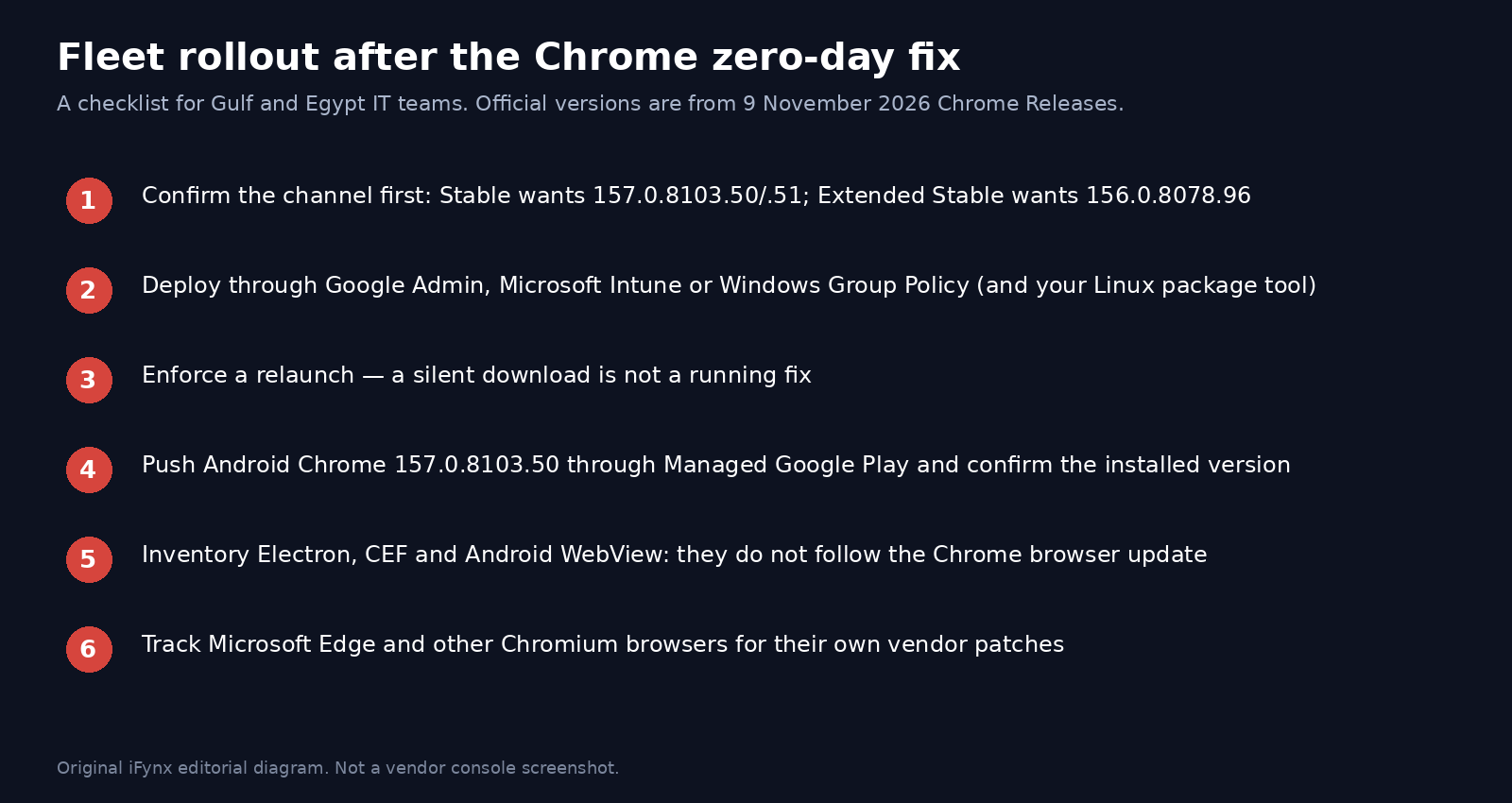
- Confirm the channel first. Some organisations pin Extended Stable; those devices need 156.0.8078.96, not a jump to 157, unless you are also changing channel.
- Deploy the fixed Stable build (157.0.8103.50 or 157.0.8103.51) or the Extended Stable build (156.0.8078.96) through the tool you already use: Google Admin (Chrome Browser Cloud Management), Microsoft Intune, or Windows Group Policy, with Linux packaged through your usual repository or management tool.
- Enforce a relaunch. A silent download leaves the vulnerable process in memory until Chrome is restarted. Use your existing relaunch or restart policy so sessions close in a planned window, not “whenever the user happens to quit.”
- Cover Android as well as PCs. Push Chrome 157.0.8103.50 through Managed Google Play, and confirm the installed version rather than assuming the assignment landed.
- Inventory browsers that are not Google Chrome: Microsoft Edge, Brave, Opera, Vivaldi and in-house Chromium forks need their own vendor builds. Edge, as of the 9 November notes, is not yet offering this fix.
- Tell staff that official update instructions will come from IT, and that a popup or WhatsApp message demanding an immediate Chrome download is probably a lure.
This sits next to the other urgent patch work we have already documented this month: the OpenSSH SSHole fix, the WordPress 7.1.4 security release, the php2shell PHP update and the Brotli / Node2Shell checklist. The same discipline applies: identify the installed version, push a known-good build, and verify what is actually running.
Electron, CEF and Android WebView are not updated by the Chrome browser
Updating Google Chrome on a laptop does not patch an Electron desktop app, a CEF (Chromium Embedded Framework) shell, or Android System WebView / Chrome Custom Tabs inside another product. Those ship their own Chromium revision. Product teams in the Gulf and Egypt that ship trading terminals, KYC capture tools, internal admin shells or Arabic chat clients on Electron or CEF should:
- Inventory every shipped app and its Chromium, Electron or CEF version, including helper processes and kiosk builds.
- Watch the Electron, CEF and Android WebView (or Android System WebView) channels for a build that includes the 9 November Chrome security fixes, then ship your own update. Do not tell customers that “Chrome is updated, so our app is fine.”
- Treat WebView on Android as a separate item from the Chrome app: a phone can have a patched Chrome and a stale WebView, or the reverse, depending on what Play Store has delivered.
The same lesson showed up in a different shape in our MCP server security briefing: the connector or runtime around the product can be the thing that actually needs the patch, not only the application users click first.
Banking and crypto users should not wait for a background update
If you use Chrome for bank logins, government services, exchange dashboards or browser wallets, update and relaunch now. You do not need to wait for a company-wide wave if your own device can take the official update today. After the relaunch, confirm the version numbers above before you open a high-value session.
Be sceptical of messages that say “your Chrome is outdated, click here.” Google and your bank will not send a random APK or a shortened link to “unlock” this update. Use chrome://settings/help, the official Google Play listing, or your IT department’s package.
A Chrome zero-day that is already exploited in the wild is exactly the kind of news that phishing kits copy within hours. If a page asks you to paste a seed phrase, a bank OTP, or an exchange API key in order to “complete the Chrome update,” stop. That is not part of the official update.
Microsoft Edge and other Chromium browsers
Chromium is shared, but the patch is not automatic. Microsoft’s 9 November 2026 security notes state that Microsoft is aware of the recent exploits existing in the wild and is actively working on releasing a security fix. The Edge 157.0.4341.42 desktop Stable build (5 November) and the Edge for Android and iOS 157.0.4341.42 build (9 November) are not a substitute for that still-pending fix. Check Microsoft’s Edge security release notes again before you declare Edge closed, and apply vendor updates for Brave, Opera and Vivaldi when they publish them.
Other High issues in the same Chrome 157 desktop release
The 9 November desktop Stable update includes nine security fixes in total, not only the in-the-wild CVE. The other High items Google listed are: CVE-2026-125345, an uninitialized resource in WebGL; CVE-2026-125347, incorrect authorization in FileSystem; CVE-2026-125343, a buffer overflow in Compositing; CVE-2026-125348, an out-of-bounds write in GPU; CVE-2026-125344, type confusion in V8; and CVE-2026-125346, a second use-after-free in XML, reported by Arni Hardarson of Neonix Security on 12 October 2026. Two Medium GPU uninitialized-resource issues are also listed. Extended Stable 156.0.8078.96 includes eleven security fixes, among them CVE-2026-125350. We list these only so patch owners know the same build closes more than one High bug. Google may keep bug details restricted, and we are not adding technical detail beyond the official descriptions.
How iFynx can help
iFynx Maintenance & Growth handles patch management, browser and dependency rollouts, and verification after launch, so a Chrome or Electron fix reaches every managed device and shipped build, not only the first laptop that checked About Chrome. Software Development builds web and desktop products, including Chromium-based apps, with a planned update path rather than a frozen embedded engine. If you need a short inventory of Chrome channels, Electron/CEF versions and Android WebView in a Gulf or Egypt fleet, book a free 30-minute discovery call.
Frequently asked questions
How do I check my Chrome version and force the update?
On a PC, open chrome://settings/help (or Menu, then Help, then About Google Chrome), wait for the check to finish, confirm 157.0.8103.50 or 157.0.8103.51 on Windows and Mac (157.0.8103.50 on Linux; 156.0.8078.96 on Extended Stable), then relaunch and read the version again. On Android, update Chrome from Google Play and confirm 157.0.8103.50 under Settings, then About Chrome.
Is Chrome on Android or iPhone affected?
Android is covered by Google’s 9 November Chrome for Android post: 157.0.8103.50, with the same security fixes as the desktop release unless otherwise noted, rolling out on Google Play over the next few days. We did not find a Chrome for iOS advisory for CVE-2026-125350 in those Chrome Releases posts. Keep iOS updated through Apple, and do not apply the desktop version numbers to Chrome on iPhone.
Are Edge, Brave and Opera affected too?
They are Chromium-based, so they need their own vendor builds; installing Chrome does not patch them. Microsoft’s 9 November 2026 Edge security notes say Microsoft is aware of the recent exploits existing in the wild and is actively working on a security fix. The Edge 157.0.4341.42 builds from 5 November (desktop) and 9 November (Android and iOS) should not be treated as this fix. Watch each vendor’s notes for Brave, Opera and Vivaldi as well.
Do I need to update Electron apps, CEF or WebView in our product?
Yes, if you ship them. Google Chrome’s desktop or Android update does not change the Chromium revision inside an Electron app, a CEF shell, or Android System WebView. Inventory those versions, wait for a component build that includes the 9 November fixes, and ship your own update. Confirm WebView separately from the Chrome app on Android.
How do I push the Chrome update across a company fleet?
Use Google Admin (Chrome Browser Cloud Management), Microsoft Intune or Windows Group Policy — and your Linux package tool — to deploy 157.0.8103.50/.51, or 156.0.8078.96 if you are on Extended Stable. Enforce a relaunch so the new build is actually running, push Android 157.0.8103.50 through Managed Google Play, and keep a separate track for Edge and other Chromium browsers, which are not fixed by the Chrome package.
Sources and update policy
Primary sources, all dated Monday 9 November 2026: Google Chrome Releases, “Stable Channel Update for Desktop“, “Chrome for Android Update“, and “Extended Stable Update for Desktop“. Microsoft, “Microsoft Edge security release notes“, entries dated 9 November 2026, 09 November 2026 and 5 November 2026, checked again before publication on 10 November 2026. Secondary: SecurityWeek and The Hacker News on 10 November 2026, including their “eighth Chrome zero-day of 2026” count, which is not a Google figure. CISA KEV was checked on 10 November 2026 and did not list CVE-2026-125350. Official update steps: Google Chrome Help. We do not describe exploit steps or unpublished bug detail. We will add a dated update if Google or Microsoft changes the fixed versions, if Edge publishes its patch, or if CISA adds this CVE to KEV.
Related reading
- OpenSSH SSHole (CVE-2026-123158): CISA Says It Is Exploited, Who Is Affected (Alpine, Docker, OpenWrt) and How to Patch by Nov 12
- WordPress 7.1.4 Security Release: 22 Vulnerabilities Fixed, the Upgrade-Window RCE, and the Update Checklist for Gulf and Egypt Sites
- PHP Vulnerability 2026 (php2shell): It Is a PHP Update, Not a WordPress Update — Patch Checklist for WordPress and Laravel Sites in the Gulf and Egypt
- Brotli Vulnerability CVE-2026-111497 (Node2Shell): Node.js, .NET and Python Patch Checklist for Gulf and Egypt Teams
- MCP Server Security After the Mittwald Breach: What Happened, Why AI-Assistant Connectors Are Now an Attack Surface, and a Lock-Down Checklist for Gulf and Egypt Teams