Direct answer — 11 November 2026: Samsung AppCloud is a preinstalled app installer that recommends third-party apps during setup and after some updates on budget Galaxy phones, mainly the A and M series. It is tied to ironSource, an Israeli-founded ad-tech company now owned by US-based Unity. The digital rights group SMEX says it collects data such as IP addresses and biometric data, has no privacy policy that users can easily find, and cannot be removed without root. That data claim has not been independently confirmed, and the security coverage we reviewed (Forbes, SamMobile, Middle East Eye) describes it as intrusive, hard-to-remove ad software, not proven spyware. Samsung says it complies with local laws and that users can manage their data. You can disable it in Settings > Apps, but users report that it can come back after a software update, so check again after each one.
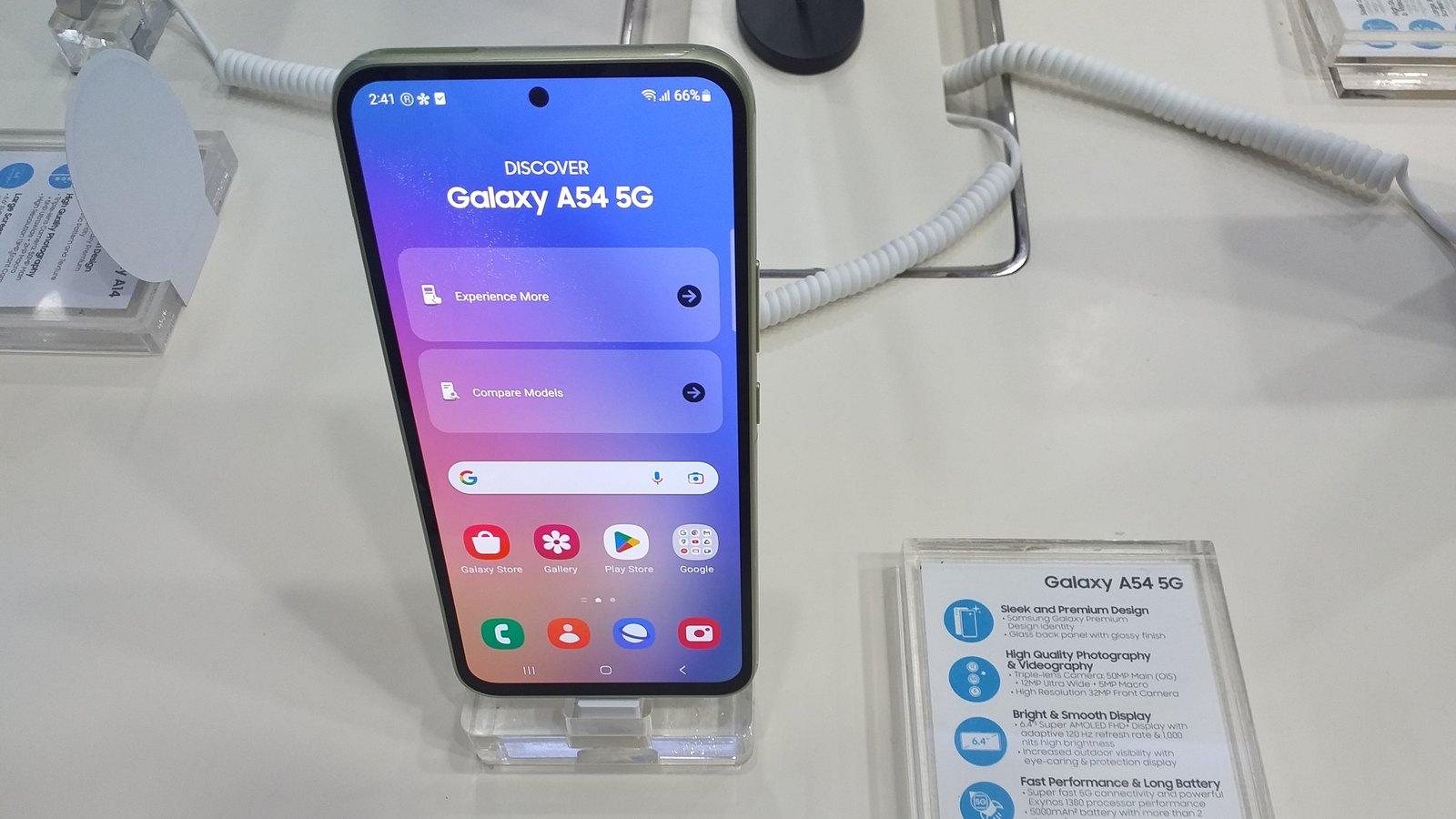

This iFynx guide is for Galaxy owners in Saudi Arabia, the UAE, Egypt and the wider region, and for the companies and app makers who serve them. We read every source again shortly before publishing (10:05–10:40 Asia/Gaza, 11 November) and checked for any new Samsung or Unity statement; we found none. We attribute every claim to the source that made it. We do not call AppCloud spyware ourselves, because no source we reviewed has shown that, and we leave politics out: this article is about what the app does and what you can control.
Key facts (checked 11 November 2026, before publishing)
- What it is: an app installer that “surfaces third-party app recommendations during device setup”, in SamMobile’s words. It keeps a notification until you choose or disable it. Android system-app database BAYTON lists its package name as
com.aura.oobe.samsung.gl, labelled “AppCloud” or “App Recs”. - Where: Galaxy A, M and F phones in India for years, and since 2022 Galaxy A and M phones in several West Asian and North African markets (SamMobile). Middle East Eye reports users in Europe and South Asia finding it too.
- Who is behind it: ironSource, founded in Israel and owned since November 2022 by Unity, a US company. Malwarebytes quotes the 2022 deal that made ironSource “Samsung’s sole partner on newly released A-series and M-series mobile devices in over 50 markets across MENA”.
- What SMEX alleges (February 2025): it “silently” collects data including “biometric data, IP Addresses, and more”, its privacy policy is “nowhere to be found online”, and full removal needs root access.
- What is confirmed: it is preinstalled, it is a system app that normal users cannot uninstall, it holds broad permissions (internet access, background downloads without a notification, start at boot, advertising ID, per BAYTON), and it can be disabled.
- What is not confirmed: that it is spyware, that it sends data to any government, or exactly what data it collects. Forbes calls it “a marketing app, not a nation state collection tool”; SamMobile found “no concrete evidence” of questionable data practices today.
- Samsung’s response (November 2025): it takes data protection “very seriously”, works “in strict compliance with local laws and regulations”, and users “have the choice to manage their personal data”. We found no new Samsung or Unity statement in this week’s wave.
- This week: a viral X post on 10 November at 15:12 UTC (17:12 Asia/Gaza) reached about 300,000 views and 3,900 reposts by the morning of 11 November, reviving a story that first spread in February and November 2025.
What is Samsung AppCloud, and why is it on my phone?
Despite the name, AppCloud is not a cloud storage service. SamMobile describes it as “essentially an app-installer”: when you set up a new Galaxy A, M or F phone, it shows a screen of suggested third-party apps and asks you to pick before setup finishes. You can tap “later”, but the app then keeps a notification on your phone until you make a choice or disable it. It does not appear as an icon on your home screen. It sits among the system apps, which is why many people only discover it when a notification appears after an update.
Phone makers ship this kind of software to earn money beyond the thin margins on budget hardware. SamMobile notes that most users long saw AppCloud as “little more than nuisance bloatware”. ironSource sells a wider product called Aura, which surfaces apps and services on phones for device makers and telecom operators. The package name starts with com.aura, but BAYTON, a database of Android system apps used by enterprise device managers, points out that no source it cited confirms AppCloud is built on Aura. We treat that link as likely, not proven.
Why is AppCloud in the news again?
The story has come in waves. In February 2025, the Beirut-based digital rights group SMEX published its analysis of AppCloud on Samsung phones in West Asia and North Africa. In May 2025, SMEX sent Samsung an open letter. In November 2025, a post on X by the International Cyber Digest newsletter called it “unremovable Israeli spyware”; Android Authority counted 7.4 million impressions. That wave produced the coverage by Forbes, SamMobile, Malwarebytes and Middle East Eye, and Samsung’s statement.
The current wave started on 10 November 2026 at 15:12 UTC (17:12 Asia/Gaza) with a post by the X account DeepLeaksHQ. By about 08:00 UTC on 11 November it showed roughly 301,000 views, 3,936 reposts and 8,900 likes. X’s own trending summary, updated at 01:55 UTC, describes boycott calls alongside analyses that call it intrusive bloatware rather than confirmed spyware. The post labels its headline “Business Wire”. We could not find a matching Business Wire release, so we do not treat that label as a source. The underlying facts are the same as in 2025; what is new is the scale of attention, mostly from Arabic-speaking and South Asian users.
Is AppCloud spyware? What is confirmed and what is claimed
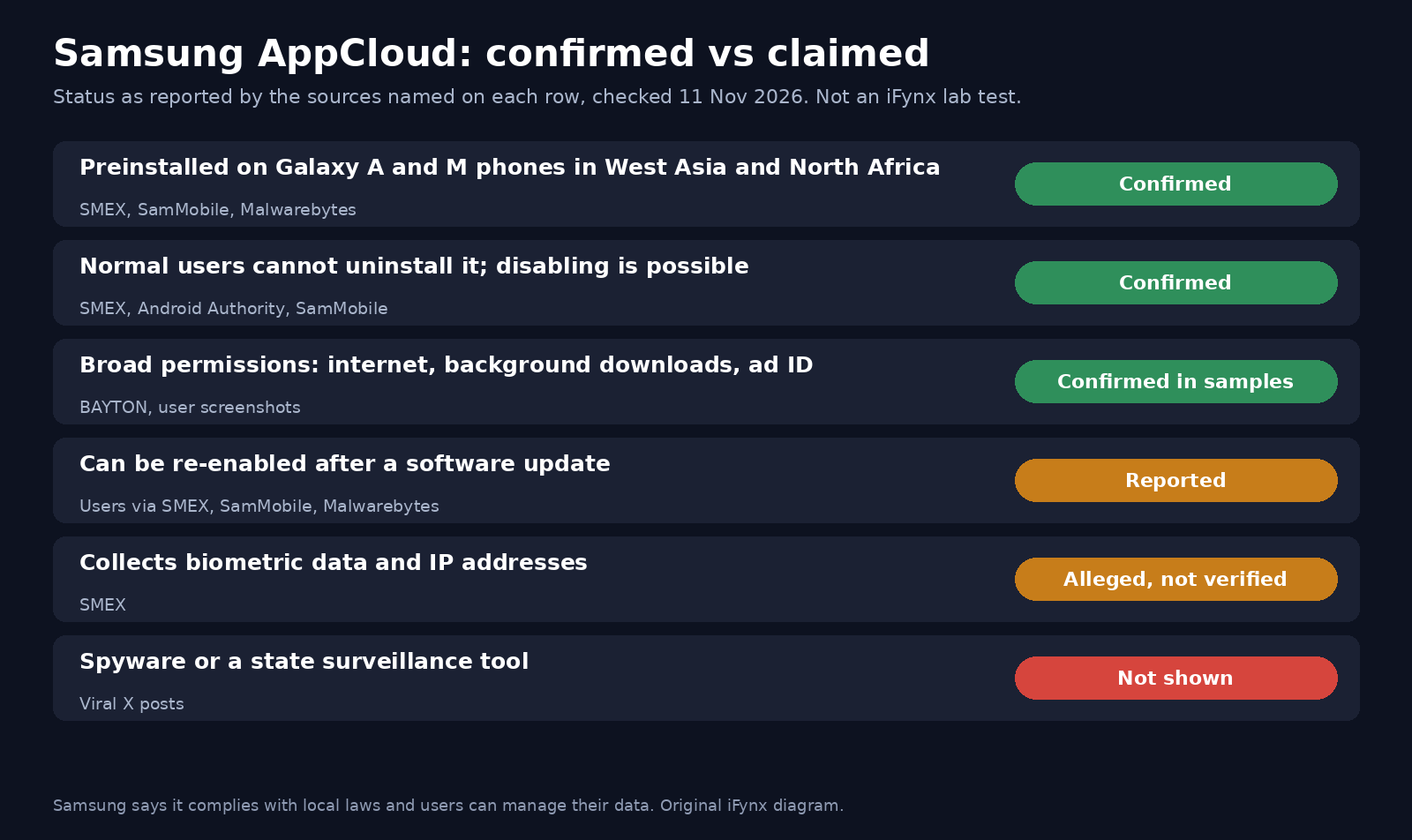
The honest answer is that the word “spyware” goes further than the evidence we have seen. Here is how the main sources line up.
| Claim | Who says it | Status |
|---|---|---|
| AppCloud is preinstalled on Galaxy A and M phones in West Asia and North Africa | SMEX, SamMobile, Malwarebytes | Confirmed by several outlets and by Samsung’s own response |
| Normal users cannot uninstall it; full removal needs root or ADB | SMEX, Android Authority, Forbes | Confirmed; disabling is possible |
| It can come back after a software update | SMEX (user reports), SamMobile, Malwarebytes | Reported by users; SamMobile says “on some devices” |
| It holds broad permissions (internet, background downloads, start at boot, advertising ID) | BAYTON, screenshots cited by Malwarebytes and Middle East Eye | Confirmed for the builds in those samples |
| It collects biometric data and IP addresses | SMEX | Alleged; not independently verified in the coverage we reviewed |
| Its privacy policy is hard or impossible to find | SMEX, SamMobile, Malwarebytes | Widely reported; SamMobile says Samsung applies its standard privacy policy |
| It is spyware or a state surveillance tool | Viral X posts | Not shown; Forbes: “a marketing app, not a nation state collection tool” |
A security researcher quoted by Middle East Eye, Ehraz Ahmed, put the middle ground well: the permissions “show the building blocks of an always-on data pipeline”, but “none of that proves classic ‘spyware'”. Malwarebytes headlined its November 2025 article “Budget Samsung phones shipped with unremovable spyware, say researchers”, and attributed the word to the researchers, not to its own testing. It also recalls ironSource’s older InstallCore product, which security vendors flagged for installing software without clear permission. That history is a reason for caution, but it is not evidence about what AppCloud does today.
What would settle it is a published technical analysis of AppCloud’s network traffic and code, or a clear data disclosure from Samsung or Unity. Neither has appeared, so we will update this article if one does.
What Samsung says
Samsung’s statement, given to Forbes and SamMobile in November 2025, reads in full: “Samsung takes the protection of our users’ data very seriously and is committed to providing a secure experience in strict compliance with local laws and regulations. We continually strive to enrich our customer experience by collaborating closely with a wide variety of regional and global partners. Samsung’s core principles of security, privacy, and user control ensure our customers have the choice to manage their personal data as they wish, with the highest level of protection possible.”
SamMobile adds that, according to Samsung, its standard privacy policy also covers AppCloud, and that users who are worried can sign in to the Samsung Privacy website with their Samsung account, open My Data and use the Deletion option. Forbes noted that the statement does not say what data the app collects or whether users will be able to delete it. Unity has not, as far as we can find, commented publicly on AppCloud. Right before publishing, we checked Samsung’s and Unity’s X accounts and recent news coverage for anything new and found nothing.
How to disable AppCloud on a Galaxy A or M phone
You do not need root, and disabling does not break the phone. BAYTON rates the package “safe to disable” and says no source it consulted reports anything on the device depending on it. Menu names can differ slightly between One UI versions.
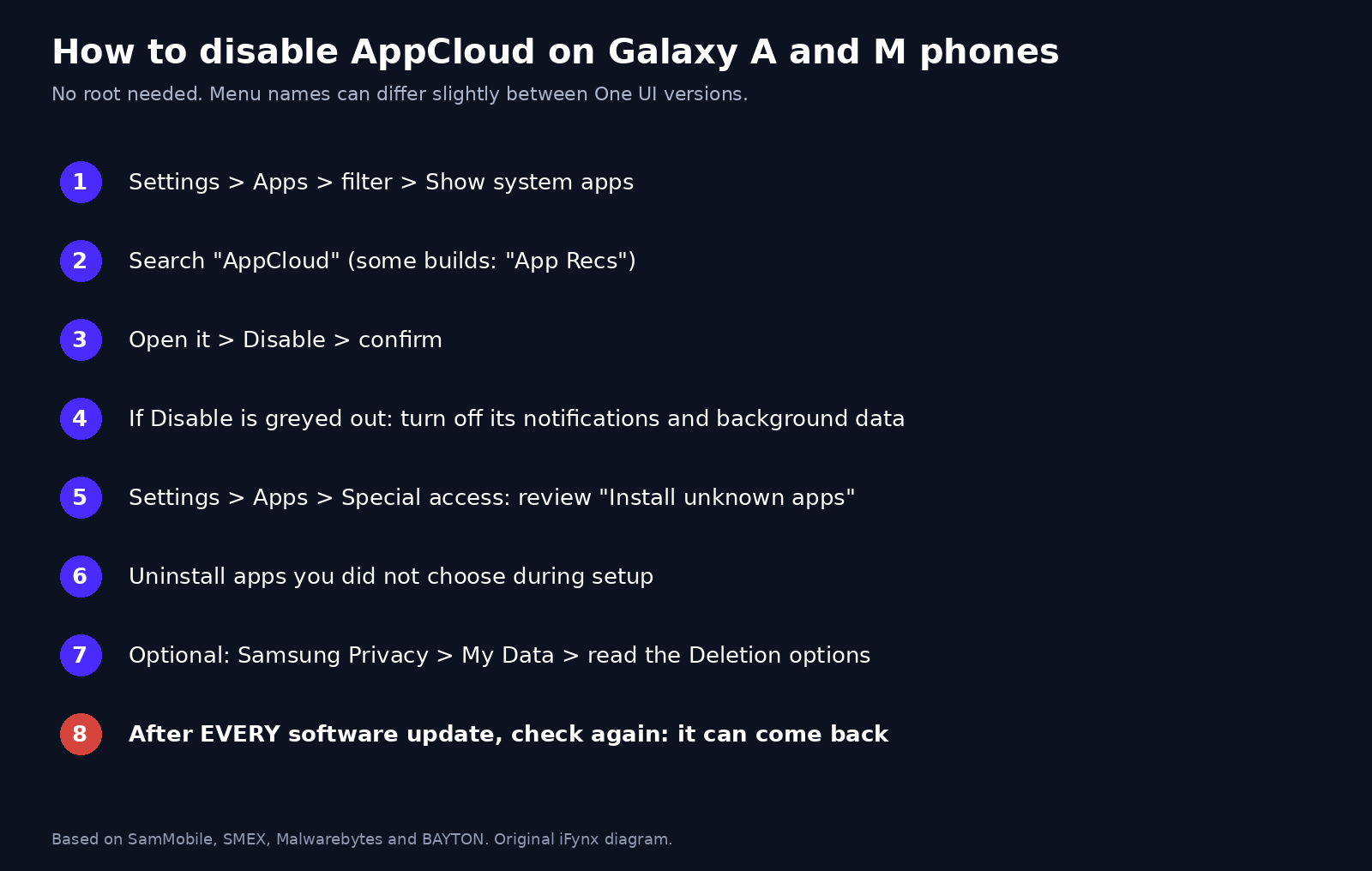
- Open Settings > Apps. Tap the filter or sort icon and turn on Show system apps.
- Search for AppCloud. On some builds it is called App Recs.
- Open it and tap Disable, then confirm. SamMobile documents these steps.
- If Disable is greyed out, open Notifications for the app and turn them off, and in Mobile data turn off background data use.
- Go to Settings > Apps > Special access (sometimes under the three-dot menu) and review Install unknown apps and other special access for apps you do not recognise.
- Look through your app list and uninstall any app you did not choose that was installed during setup.
- If you are worried about stored data, sign in at Samsung Privacy, open My Data and read the Deletion options before you confirm anything.
- After every software update, repeat steps 1 to 3. SamMobile, Malwarebytes and SMEX all report that the app can be re-enabled after an update.
For advanced users only: Android Authority notes that AppCloud can be removed with ADB, the developer tool that talks to a phone over USB. With USB debugging on, the command adb shell pm uninstall --user 0 com.aura.oobe.samsung.gl removes it for your user without root. The system copy stays on the phone, so a factory reset brings it back, and you can restore it with adb shell cmd package install-existing com.aura.oobe.samsung.gl. Check the package name on your own phone first, and only remove packages you are sure about.
On a new phone, read the app-suggestion screen during setup and untick everything you do not want instead of tapping through.
Disable checklist in one picture
The diagram below puts the steps on one page you can share with family or staff.
What companies should do: MDM and Knox for staff phones
Many companies in the Gulf and Egypt give staff budget Galaxy A phones, or let staff use their own. An app that installs other apps and holds an advertising ID has no business purpose on a work phone, whatever its intent. Treat it as you would any unwanted preload:
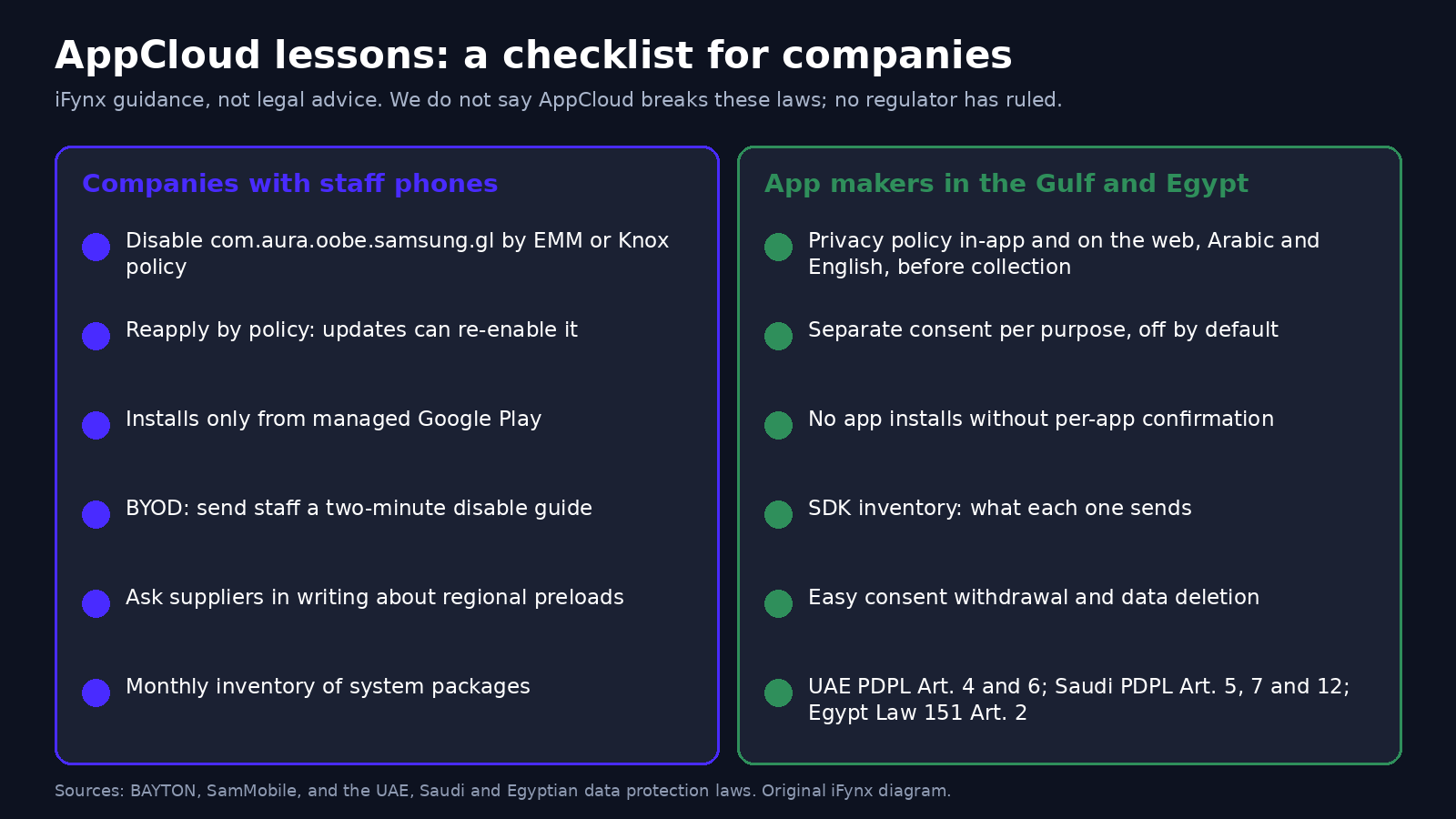
- Company-owned phones: in your Android Enterprise EMM or Samsung Knox Manage, add
com.aura.oobe.samsung.glto a disabled or blocked apps policy. BAYTON notes that on devices managed through the Android Management API, an application policy with the disabled flag set is the equivalent control. - Enforce it as policy, not as a one-off. Because updates can re-enable the app, a policy that the EMM reapplies is better than a manual change.
- Approved-apps list: allow app installs only from your managed Google Play, so a recommender cannot add apps to work phones.
- Personal phones (BYOD): a work profile keeps company data separate, but the company does not control the personal side. Send staff a two-minute guide (the checklist above) instead of trying to manage personal settings.
- Procurement: when you buy phones in bulk, ask the supplier in writing which third-party preloads are on the regional build and whether they can be removed before delivery.
- Inventory: run a monthly report of installed system packages across the fleet and check for new preloads after each One UI update.
If you are new to device security, our guides on Android TV box malware (malware preinstalled at the factory, a different and more serious problem) and on Apple threat notifications and mercenary spyware explain what real spyware looks like and how it is detected.
What app makers in the Gulf and Egypt should learn: consent-first onboarding
The AppCloud story is a warning for every company that ships an Android app or partners with a phone maker, telecom operator or ad network. Users are now quick to call any silent, hard-to-remove software “spyware”, and the data protection laws in the region set clear expectations. We are not saying AppCloud breaks these laws; SMEX says it “potentially” does, and no regulator has ruled on it. These are the rules your own product has to meet:
- UAE: Federal Decree-Law No. 45 of 2021 (PDPL) Article 4 prohibits processing personal data without consent, except in listed cases. Article 6 says consent must be “clear, simple, unambiguous and easily accessible”, the controller must be able to prove it, and the user must be able to withdraw it easily.
- Saudi Arabia: the PDPL’s Article 5 forbids processing personal data without consent except in cases the law sets. Article 12 requires a privacy policy to be made available “prior to collecting” personal data, stating the purpose, the data, how it is collected, stored and destroyed, and the user’s rights. Article 7 says consent may not be made a condition of a service unless the processing is directly related to it. See our Saudi PDPL compliance checklist.
- Egypt: Law No. 151 of 2020 Article 2 says personal data may not be collected, processed or disclosed without the data subject’s explicit consent, except where the law allows it.
In practice, consent-first onboarding means:
- A privacy policy reachable from inside the app and on the web, in Arabic and English, before any data is collected.
- A separate, clear choice for each purpose (analytics, personalised ads, app recommendations), switched off by default.
- No app installs without the user confirming each app; never a pre-ticked list.
- An inventory of every SDK in your app and what each one sends, as in our analytics SDK checklist.
- An easy way to withdraw consent and delete data, and a Google Play Data safety form that matches what the app really does.
Business checklist in one picture
The second diagram sums up the company and app-maker steps.
Is the iPhone affected?
No. AppCloud is an Android preload on Samsung phones. iPhones do not have it. iPhone users have their own security updates to watch; our guide to the iOS worse_query vulnerability covers the latest one. And whatever phone you use, be wary of “remove the spyware now” links and apps shared in viral posts: scammers use panics like this one to push fake cleaners. Our guide to online fraud in the UAE explains the common tricks.
How iFynx can help
Build apps your users can trust, in Arabic and English.
iFynx designs, builds and maintains web and mobile products for companies in the Gulf, Egypt and Palestine. The AppCloud backlash shows what happens when users cannot see or control what an app does. We help you avoid that:
- Product Design and UX/UI Design: consent and permission screens, privacy-by-design onboarding and clear Arabic privacy notices that users actually read.
- Software Development: Mobile App Development and API & Backend Engineering: Android and iOS apps with transparent data collection, server-side consent records and no hidden installs.
- Maintenance & Growth: Software Maintenance and Quality Assurance: SDK and privacy audits of your existing apps, checks against UAE, Saudi and Egyptian data rules, and fixes before your users find the problem.
Contact us for a free 30-minute privacy and SDK review of your app.
Frequently asked questions
What is AppCloud and why is it on my Samsung phone?
AppCloud is a preinstalled app installer on budget Samsung Galaxy phones, mainly the A and M series (and F in India). It recommends third-party apps during setup and keeps a notification until you choose or disable it. It is tied to ironSource, an Israeli-founded company owned by US-based Unity, which has partnered with Samsung in the region since 2022.
Is AppCloud spyware?
It has not been shown to be. SMEX says it collects data such as IP addresses and biometric data and has no easy-to-find privacy policy, but that claim has not been independently verified. Forbes calls it a marketing app, not a nation-state collection tool, and SamMobile found no concrete evidence of improper data handling. Samsung says it complies with local laws. It is intrusive, hard to remove and should be disabled if you do not want it.
How do I disable or remove AppCloud?
Open Settings, then Apps, turn on Show system apps, search for AppCloud (or App Recs), open it and tap Disable. Turn off its notifications and background data too. Advanced users can remove it for their user with ADB using the package name com.aura.oobe.samsung.gl, without root. A factory reset brings it back.
Why does AppCloud come back after an update?
It is part of the system software Samsung ships, so a One UI or security update can restore or re-enable it. SamMobile, Malwarebytes and SMEX all report this. Check Settings, then Apps after every update and disable it again. Companies should enforce the disable through an MDM or Knox policy that is reapplied automatically.
Which phones have AppCloud, and is the iPhone affected?
Reports name Galaxy A and M phones sold in West Asia and North Africa since 2022, Galaxy A, M and F phones in India, and some devices in Europe and South Asia. Flagship Galaxy S and Z phones are not named in the reports we reviewed. The iPhone is not affected: AppCloud is an Android preload on Samsung devices.
Sources and update policy
Read on 11 November 2026 (10:05–10:40 Asia/Gaza): SMEX, “Invasive Israeli-founded bloatware is harvesting data from Samsung users in WANA”, 13 February 2025; SamMobile, “Israeli-founded app preloaded on Samsung phones is attracting controversy”, with Samsung’s statement, last updated 19 November 2025; Malwarebytes, “Budget Samsung phones shipped with unremovable spyware, say researchers”, 20 November 2025; Forbes, “Has Samsung Installed ‘Unremovable Israeli Spyware’ On Your Phone?”, 18 November 2025; Middle East Eye, “Samsung users report ‘unremovable’ Israeli bloatware AppCloud on devices”, 17 November 2025; Android Authority, AppCloud explainer, 17 November 2025; BAYTON System app database, com.aura.oobe.samsung.gl; the viral X post of 10 November 2026. Law texts: UAE Federal Decree-Law No. 45 of 2021, Saudi Personal Data Protection Law, Egypt Law No. 151 of 2020. iFynx did not test AppCloud’s network traffic. The checklists are iFynx guidance, not legal advice. We will update this article if Samsung or Unity publishes new information, if a technical analysis of AppCloud’s data collection appears, or if a regulator in the region comments.
Related reading
- Android TV Box Malware: Google Takes Down the XCPE Botnet in 1.3 Million Boxes. Is Your Box or IPTV Receiver Infected? A Check-and-Replace Guide for Egypt, Iraq, the Gulf and Palestine
- Apple Threat Notification: Germany Warns MPs and Ministers of Mercenary Spyware on iPhones. How to Tell a Real Alert From a Scam, and a Lockdown Mode Guide for the Gulf, Egypt and Palestine
- Coinbase Data Breach via Amplitude: What Leaked, What Didn't, and the Analytics SDK Checklist for Gulf and Egypt Apps