Published 3 November 2026, 01:07 Asia/Gaza. We will add dated updates as the BSI, Apple or the German government say more.

Quick answer: Since 29 October, several members of Germany’s Bundestag, members of the federal government and other public figures have received an Apple threat notification warning of an attack with mercenary spyware on their iPhones. Germany’s cyber agency, the BSI, says on its guidance page that it does not know whether phones were actually compromised or only targeted. Who is behind it, how many people were notified and who they are have not been disclosed. The BSI tells recipients to assume compromise, update iOS, turn on Lockdown Mode and consider a new phone and number. A real Apple alert shows on the Lock Screen, in Settings, by email and at account.apple.com, and never asks you to tap a link or share a code.
Key facts
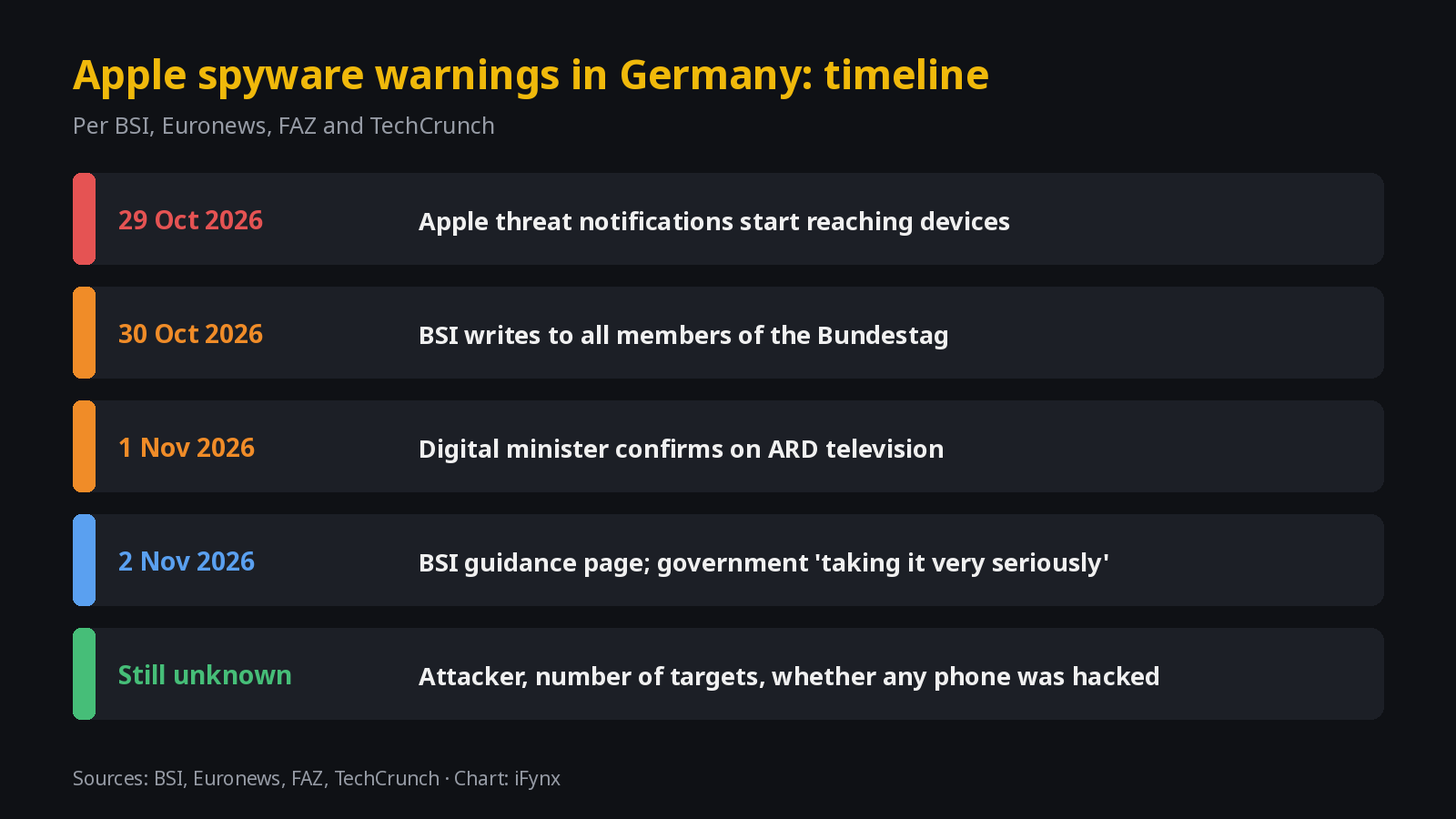
- When: alerts from 29 October 2026; BSI letter to MPs on 30 October; first public report on ARD on 1 November, where Digital Minister Karsten Wildberger confirmed the warnings (FAZ, Euronews).
- What Apple says the alert means: a high-confidence warning that a person was individually targeted. It does not say whether the attack worked.
- What such spyware can do, per the BSI: read messages, including encrypted messengers, and access calls, contacts, calendar and location, and switch on the camera and microphone. Infection is often “zero-click”, with no tap needed.
- Government reaction: spokesperson Stefan Kornelius said Berlin was “taking the incident and the warning very seriously”, per the Financial Times via TechCrunch.
- Not disclosed: the attacker, the spyware used, the number of recipients and their names.
What happened in Germany
The BSI says it learned that several Bundestag members and other public figures had received Apple threat notifications on their devices since 29 October. In a letter dated 30 October it warned all members of the Bundestag and asked recipients to contact it directly. It published public guidance on 2 November. “It is purely speculative what exactly this is about; we have to wait,” Wildberger told ARD, as quoted by FAZ.
The alerts were not limited to Germany. TechCrunch reports that a Beirut-based filmmaker posted on X that he received a new notification, and that his notice said the latest batch went to users in 99 countries. Apple says it has notified users in more than 150 countries since 2021 and does not attribute attacks to any attacker or region. Mercenary spyware is sold by private companies to governments; the best-known historical example is Pegasus, which Apple and the BSI both cite. We do not know which tool, if any, was used this time.
| Item | What is reported | Status | Source |
|---|---|---|---|
| Alerts began | 29 October 2026 | Confirmed by BSI | BSI |
| Who received them | Several Bundestag members, members of the federal government and other public figures | Names and number not disclosed | BSI; Euronews |
| Were phones actually hacked? | BSI does not know: real compromise or only attempts | Unknown | BSI |
| Who is behind it | Not disclosed; Apple does not attribute attacks | Unknown | Apple; TechCrunch |
| BSI advice | Assume compromise, update iOS, Lockdown Mode, consider new device and number | Published | BSI |
| Beyond Germany | Latest batch went to users in 99 countries, per one recipient’s notice | As reported | TechCrunch |
Status as of 3 November 2026, 01:07 Asia/Gaza.
What an Apple threat notification is, and how to tell a real one from a scam
Apple sends these alerts when its own threat intelligence finds activity consistent with a mercenary spyware attack on a specific person. It calls them “high-confidence alerts” that “should be taken very seriously”, and says the vast majority of users will never be targeted (Apple). Because the alerts make the news, scammers copy them. Four rules:
- Real alerts live inside the iPhone. Lock Screen and Settings, plus email to your Apple Account addresses, plus a banner at account.apple.com.
- Apple never asks you to act through a link. No links to tap, no files, no apps or profiles to install, no passwords or verification codes, by email or by phone.
- Check it yourself. Type account.apple.com into your browser and sign in. If Apple sent an alert, it is at the top of the page.
- Ignore “Apple security” callers. Nobody from Apple will call you about a threat notification.
Arabic-language phishing warning
Expect fake SMS and WhatsApp messages in Arabic such as «تنبيه أمني من آبل: تم اكتشاف برنامج تجسس على جهازك، اضغط هنا». Apple does not send threat notifications by SMS or WhatsApp, and never with a link. Delete the message and check account.apple.com yourself.
If you received one: what to do, and what not to do
- Decide about forensics first. The BSI says update the OS immediately unless a forensic analysis is planned. If you want one, contact Access Now’s helpline, which Apple recommends, before you update or reset.
- Update iOS, then turn on Lockdown Mode and keep it on, also on any new device. The BSI notes Lockdown Mode makes new attacks harder but does not remove an existing infection.
- If the risk is high, change the phone and the number, and reset every account used on the old phone.
- Set a new device passcode different from the old one, change your Apple Account and email passwords, and set up authenticator apps again instead of transferring them.
- Lock messengers: Signal registration lock and WhatsApp two-step verification with a new PIN; remove unknown linked devices there and in your Apple Account.
- Do not install “anti-spyware” apps, reply to callers who mention the alert, or post screenshots that show your email or number.
Lockdown Mode: what it blocks and how to turn it on
Per Apple, Lockdown Mode blocks most message attachment types and link previews, some complex web technologies (web fonts may not display), FaceTime calls from people you have not called in 30 days, shared albums, new configuration profiles and MDM enrolment, auto-joining non-secure Wi-Fi, and 2G/3G. Phone calls, plain text messages and emergency SOS keep working. You can exclude a trusted app, website or (on iOS 27) contact, which reduces protection.
- Settings > Privacy & Security.
- Scroll down, tap Lockdown Mode, then Turn On Lockdown Mode.
- Tap Turn On Lockdown Mode again.
- Tap Turn On & Restart, then enter your passcode.
On Android, the closest equivalent is Google’s Advanced Protection (Android 16 and later): Settings > Security & privacy > Other settings > Advanced Protection > Device protection.
Why this matters in the Gulf, Egypt and Palestine
The region has a documented history of mercenary spyware use against journalists and activists. Citizen Lab found that operators it attributed to Saudi Arabia and the UAE hacked 36 phones of Al Jazeera journalists and staff in 2020 with a zero-click iMessage exploit (Citizen Lab). Its 2018 mapping found suspected Pegasus infections in countries including Egypt, Palestine, Saudi Arabia, the UAE, Qatar, Bahrain, Jordan and Iraq (Citizen Lab), and it documented two Egyptians hacked with Predator spyware (Citizen Lab). Amnesty International’s Security Lab also works on spyware cases. A German alert wave is a reminder to anyone in the region whose work makes them a target.
Checklist for journalists, executives and NGO staff
- Update now, every time. Install iOS updates the day they come out. Most of these attacks use flaws that updates close.
- Turn on Lockdown Mode if your work makes you a target. Settings > Privacy & Security > Lockdown Mode > Turn On Lockdown Mode > Turn On & Restart (Apple guide). Turn it on separately on your iPad and Mac.
- Use a separate phone and number for sensitive work. Keep the number off public profiles, and keep personal apps off the work phone.
- Lock your accounts. A long device passcode, Apple Account two-factor authentication, WhatsApp two-step verification and Signal registration lock, each with a new PIN.
- Check linked devices monthly. Apple Account device list, WhatsApp and Signal linked devices, Telegram active sessions. Remove anything you do not recognise.
- Do not open links or attachments from unknown senders, as Apple advises all users, and install apps only from the App Store.
- Know who to call. Journalists, activists and NGO staff can reach Access Now’s Digital Security Helpline 24/7, in Arabic too.
For Gulf banks, ministries and large companies: MDM and BYOD
- Lockdown Mode on executive and board devices. Apple says a device already enrolled in MDM stays managed after Lockdown Mode is turned on, but a device in Lockdown Mode cannot be newly enrolled. So enrol first, then turn it on. Admins cannot switch it on remotely; the user must.
- Separate numbers for leaders. Give ministers, executives and treasury staff work numbers that are not published, and keep personal WhatsApp off those phones.
- An iOS update deadline. Set a policy such as 48 hours for critical iOS updates on managed devices, and block access from devices that fall behind.
- BYOD is not enough for high-risk roles. A personal phone with unknown apps and an old iOS version should not hold board papers or payment approvals.
- A playbook for an alert. Who the person calls first, when to preserve the phone for forensics, how to issue a clean device and number, and which accounts to reset.
Where to get help
- Access Now Digital Security Helpline: free, 24/7, in Arabic among 10 languages, for civil society, journalists and human rights defenders. Apple recommends it to recipients.
- Citizen Lab and Amnesty International Security Lab: research groups that investigate spyware cases.
- Saudi Arabia: the National Cybersecurity Authority takes incident reports involving national entities on 936 or is@nca.gov.sa, and reports from individuals through its cybersecurity violation service (NCA).
- Egypt: EG-CERT, set up by the NTRA, handles incident response.
- We could not verify an incident-reporting page on the UAE Cyber Security Council’s or Palestine CERT’s own websites tonight, so we do not list contacts for them.
Related on iFynx: the XCPE Android TV box botnet, UAE online fraud and how to report it, the Coinbase data breach, SAMA Tap to Pay on iPhone and iPhone Duo apps checklist.
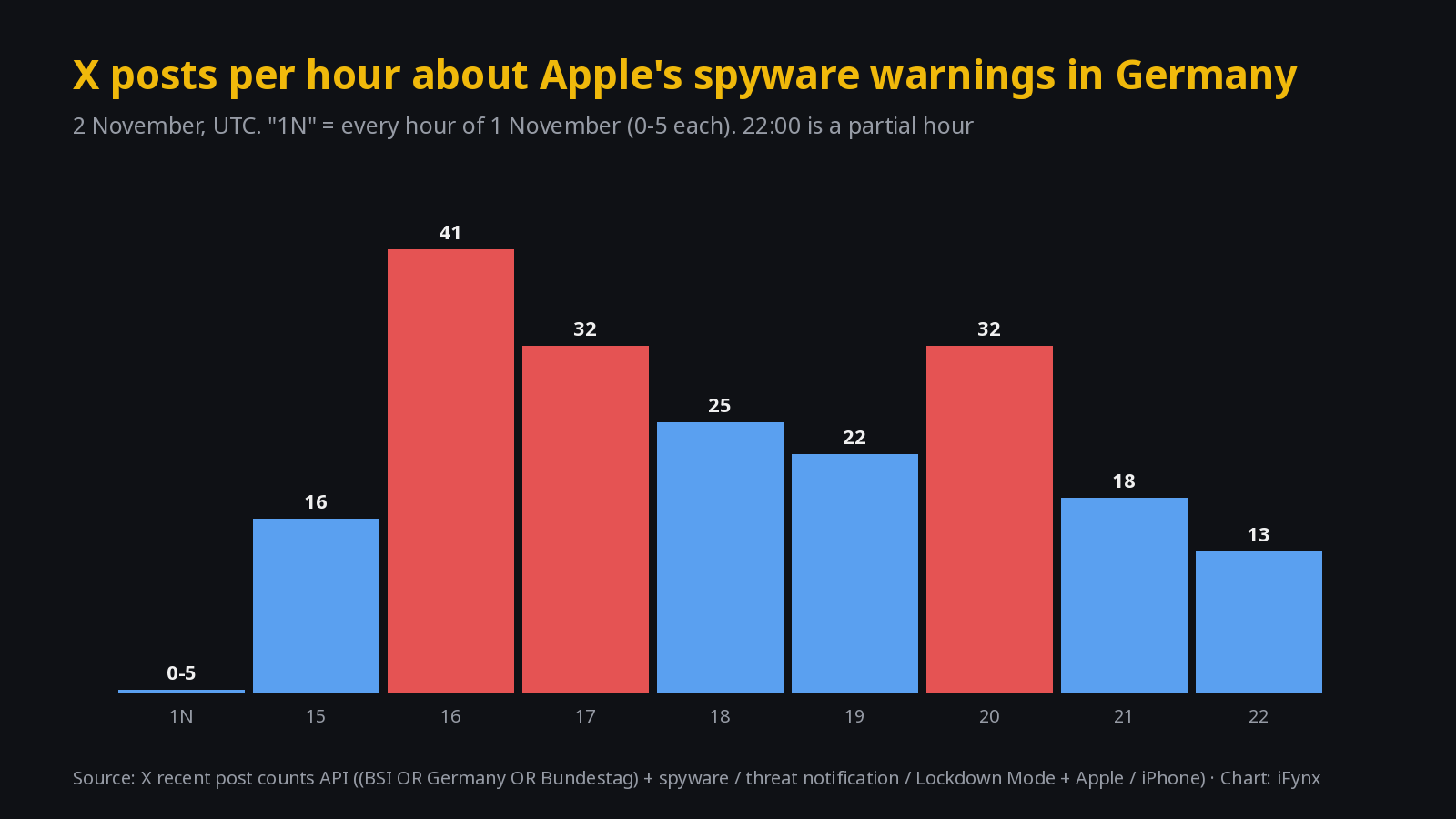
Attention on X
What we are watching next
- Whether the BSI or the government says how many people were notified, and whether any phone was confirmed hacked.
- Whether Apple ships an iOS security update linked to this wave.
- Whether more countries, including in the Middle East, report recipients.
How iFynx can help
iFynx builds bilingual banking, fintech and government apps for the UAE, Saudi Arabia and Egypt, including clear in-app security notices and device-trust flows. See our services.
Frequently asked questions
What is an Apple threat notification, and is it real or a scam text?
It is a warning Apple sends when it believes someone has been individually targeted by mercenary spyware. A real one appears on the iPhone Lock Screen and in Settings, comes by email to your Apple Account addresses (Apple says from threat-notifications@email.apple.com), and shows as a banner at the top of account.apple.com after you sign in. Apple says it never asks you to click links, open files, install apps or profiles, or give a password or code. An SMS or WhatsApp message with a link is not how Apple sends these alerts.
What should I do if I get one?
Assume the phone may be compromised, as Germany’s BSI advises. If you want expert forensic analysis, contact a helpline such as Access Now before you update or reset, so evidence is not lost. Otherwise update iOS immediately, turn on Lockdown Mode and keep it on, change your Apple Account and email passwords from a clean device, and review linked devices in WhatsApp, Signal and your Apple Account. Do not reply to anyone who contacts you about the alert, and do not install any “security” app.
What does Lockdown Mode block, and will it break WhatsApp, banking or Arabic websites?
Apple says it blocks most message attachment types and link previews, some complex web technologies, FaceTime calls from people you have not called in 30 days, new configuration profiles and MDM enrolment, and 2G/3G. Phone calls and plain text messages keep working. Apps keep running, but web content inside them can be limited; you can exclude a trusted app or website. Web fonts may not load, so some Arabic websites can look different.
Can spyware survive a reset? Should I replace the phone?
Apple and the BSI do not say a reset is enough. The BSI says Lockdown Mode makes new attacks harder but does not remove an existing infection, and that anyone who judges the risk as high should consider a new device and a new phone number, and reset all accounts used on the old one.
Does Android have an equivalent?
Yes. Google’s Advanced Protection for Android (Android 16 and later) turns on the strongest device security settings in one switch: Settings > Security & privacy > Other settings > Advanced Protection > Device protection.
How do I know if my phone is hacked?
There is no reliable self-test for mercenary spyware: it is built to stay invisible. A genuine Apple threat notification is the strongest signal. The BSI says unusual behaviour compared with past months, such as frequent crashes or fast battery drain, is a reason to be more cautious. For a real check, ask an expert helpline for a forensic analysis.
Which countries have received Apple threat notifications?
Apple says it has notified users in more than 150 countries since 2021 and does not attribute attacks to any attacker or region. TechCrunch reports that the notice sent to one recipient in Beirut said the latest batch went to users in 99 countries.
Sources
- BSI: Bedrohungsbenachrichtigungen von Apple zu Mercenary Spyware, November 2026
- Apple: About Apple threat notifications; Apple: About Lockdown Mode
- TechCrunch, 2 November 2026; Euronews, 2 November 2026; FAZ, 1 November 2026
- Google: Advanced Protection for Android
- Citizen Lab; Citizen Lab; Citizen Lab; Amnesty Security Lab; Access Now Helpline; NCA; EG-CERT
- X post counts: X recent counts API, queried about 23:00 UTC, 2 November 2026
- Cover photo: Jürgen Matern, Wikimedia Commons, CC BY-SA 3.0, cropped. In-article photo: Dennis Cortés, Wikimedia Commons.jpg), CC0, cropped. Charts: iFynx.
