Direct answer — 15 November 2026: Trezor has confirmed that three Trezor Safe 5 hardware wallets sold by CryptoBilis, a former Trezor reseller in Southeast Asia, contained a hidden extra circuit board that copies the recovery words shown or typed on the screen and sends them to the attackers over the mobile network. All three were bought between 20 August and 23 September 2026. Trezor released firmware 2.13.1 on 11 November, which it says stops the implants found so far from capturing anything, but the update cannot protect a recovery phrase that was already captured. If you bought a Trezor from CryptoBilis since March 2026, move your funds to a new wallet with a new seed and contact Trezor Support for a replacement. Trezor has found no implants in devices from other resellers or in other models, and no owner has reported lost funds.
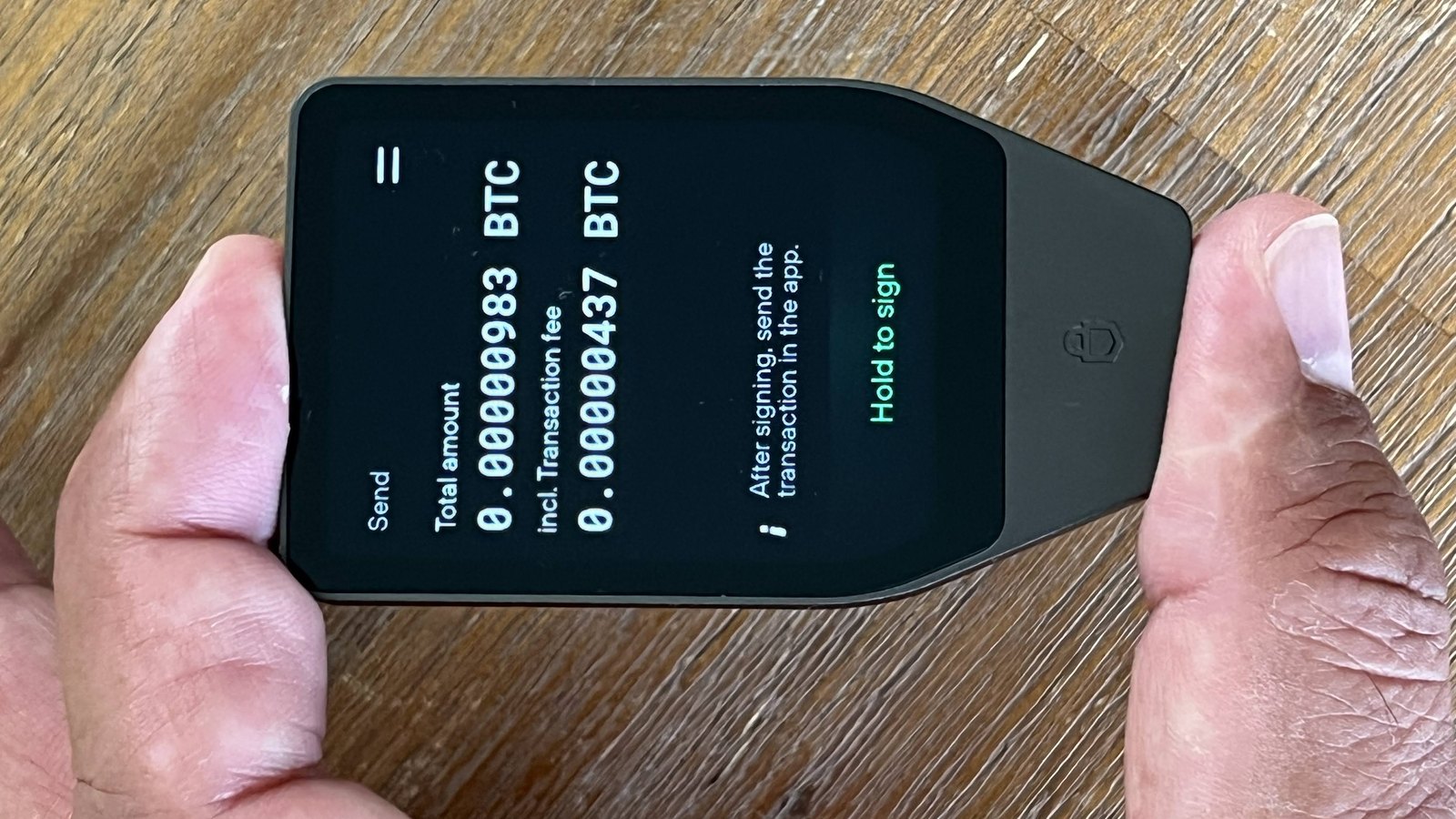

This is the iFynx (آيفينيكس) briefing for crypto users, exchanges and wallet teams in the UAE, Saudi Arabia, Egypt and Palestine. Most buyers in our region will never touch a CryptoBilis box. But many buy hardware wallets the same way CryptoBilis customers did: from a marketplace seller, a big electronics store, a friend returning from Asia, or a Telegram shop offering a better price. So this article does three things. It sets out what Trezor has actually confirmed, it explains what the 2.13.1 update does and does not do, and it gives a provenance checklist for anyone buying a cold wallet in the Gulf or Egypt. We re-checked both Trezor notices before publishing (09:05 Asia/Gaza, 15 November). We do not publish implant schematics, and we do not guess who is behind the attack.
Key facts in six numbers
3
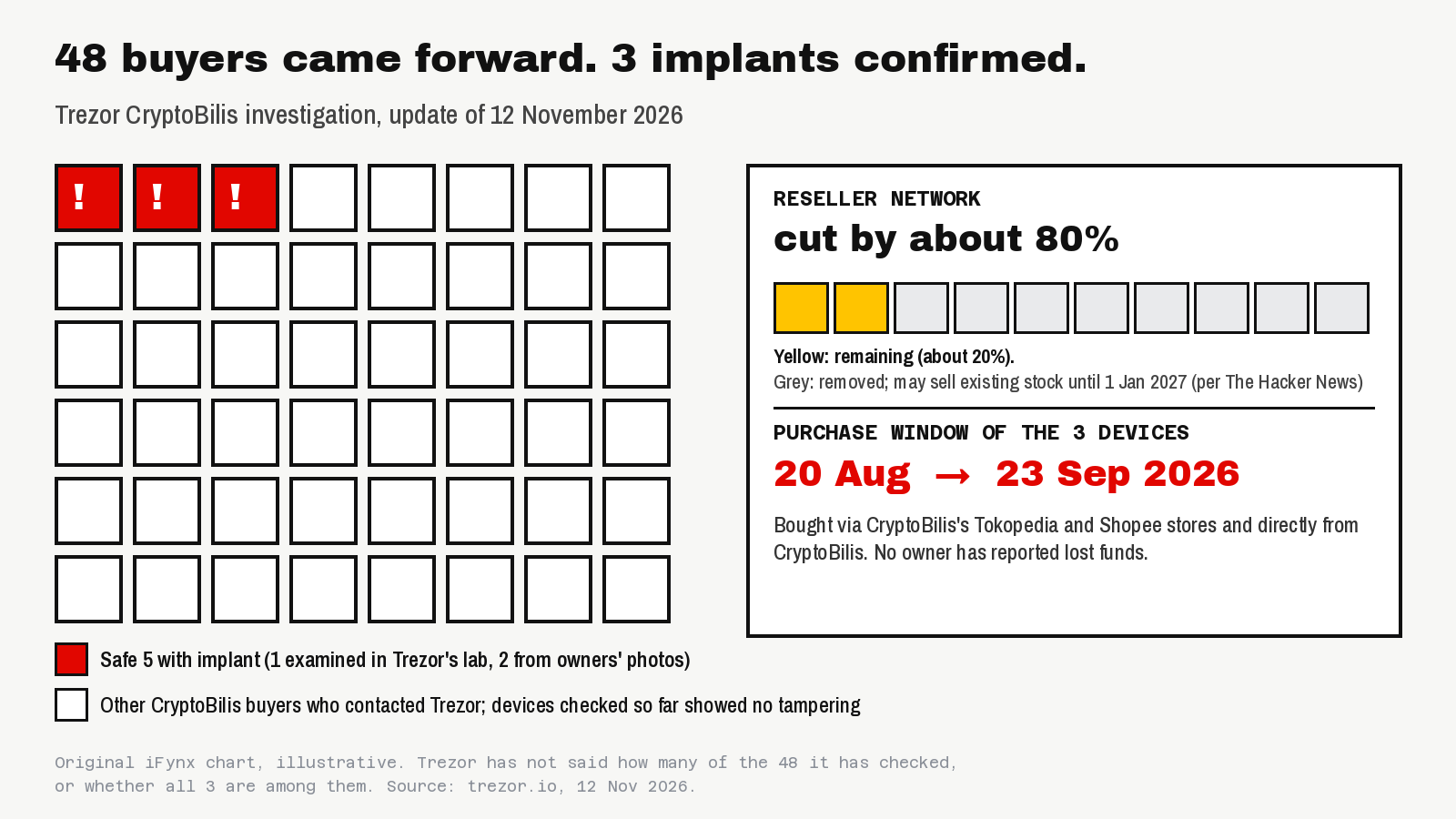
Trezor Safe 5 devices from CryptoBilis confirmed with an implant (one examined in Trezor’s lab, two from owners’ photos).
48
CryptoBilis buyers who had contacted Trezor by 12 November. Devices checked so far showed no other tampering.
20 Aug – 23 Sep
Purchase window of the three tampered devices, via CryptoBilis’s Tokopedia and Shopee stores and directly.
2.13.1
Firmware released 11 November. Trezor says it stops the known implants from capturing anything.
~80%
Cut to Trezor’s reseller network, with much stricter rules for the resellers that remain.
0
Reported fund losses from Trezor owners so far. Ledger’s CryptoBilis case was different: wallets were drained.
Am I affected? Find your row
Trezor’s guidance depends on where your device came from. Here is the short version, in Trezor’s own terms.
| Where you bought it | Risk today | What to do |
|---|---|---|
| CryptoBilis (its Tokopedia or Shopee store, or directly), any time since March 2026 | Treat as compromised, even if your unit has not been checked | Move funds to a new wallet with a new seed. Keep the device and contact Trezor Support for a replacement. |
| CryptoBilis, but you have not set it up yet | Do not use it | Do not set it up, and never type an existing recovery phrase into it. Contact Trezor Support. |
| You do not know (gift, second-hand, marketplace, a friend’s trip) | Unknown | Contact Trezor Support with what you know. If in doubt, a new wallet from a trusted source plus a new seed is the safe path. |
| Directly from trezor.io or a listed authorized reseller | No confirmed cases outside CryptoBilis | Update to firmware 2.13.1 and keep your recovery phrase offline. No need to move funds because of this incident. |
One detail matters more than any other: restoring your old recovery phrase on a new device does not help. If the implant captured the phrase, the attacker can rebuild the wallet anywhere. Only a brand-new seed, with the funds moved to it, removes the risk.
What Trezor found in its 12 November update
On 30 October Trezor published a first notice. A customer in Indonesia had reported, through responsible disclosure on 28 October, an extra board inside a Trezor Safe 5 bought from CryptoBilis in August via Tokopedia. Trezor had not yet seen the device but called the report credible and warned buyers early. CryptoBilis had been an official Trezor reseller in Southeast Asia until 9 October, the day Ledger started investigating fund losses among the same reseller’s customers, and Trezor removed it that day.
The 12 November update moves from “reported” to “confirmed”. Trezor’s lab examined the first device, and two more tampered Safe 5 units were identified from photos sent by their owners. All three were bought between 20 August and 23 September 2026. After the October warnings, 48 CryptoBilis buyers contacted Trezor, and the company is checking their devices in its lab or from photos of the internals. Trezor has not said how many it has checked so far. It also checked devices from its other resellers in the region and found no evidence of tampering, and it has found no implant in any model other than the Safe 5.
How the implant works, without the dangerous detail
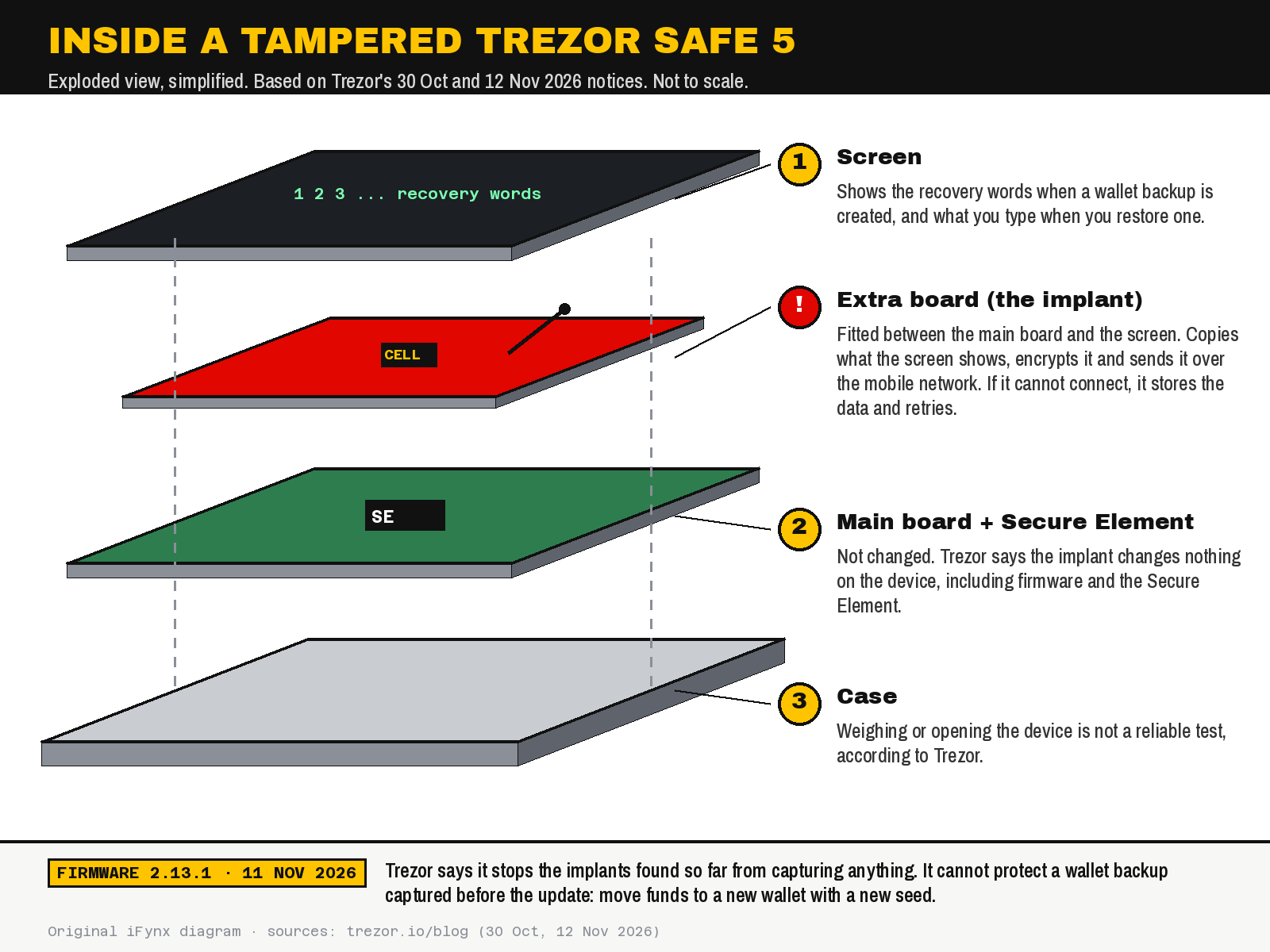
Trezor’s embedded team extracted and analysed the firmware of the implant in the first device. In plain language:
- Where it sits: an extra circuit board fitted between the Safe 5’s main board and its screen.
- What it does: it only listens. It copies everything the screen shows, including what you type on the device, and recognises recovery words when they appear. That covers the words shown when you create a wallet backup and the words you type when you restore an existing wallet. It does the same with a passphrase if one appears on screen.
- How data leaves: it encrypts what it captured and sends it over the mobile network to a server controlled by the attackers. If it cannot connect, it keeps the data and retries until it succeeds.
- What it does not touch: the device’s firmware and Secure Element. Trezor says it works the same way as the implants found in Ledger devices, adapted to the Safe 5’s display.
That last point explains why this attack is so uncomfortable. Because nothing on the device itself is changed, software that checks whether the firmware or chip is genuine is not designed to catch it. Ledger said the same about its own integrity checks. And Trezor is clear that home tests do not work either: weighing the device or opening it is not a reliable way to rule out tampering. We do not reproduce schematics or component lists here.
Ledger and Trezor: one reseller, two very different outcomes
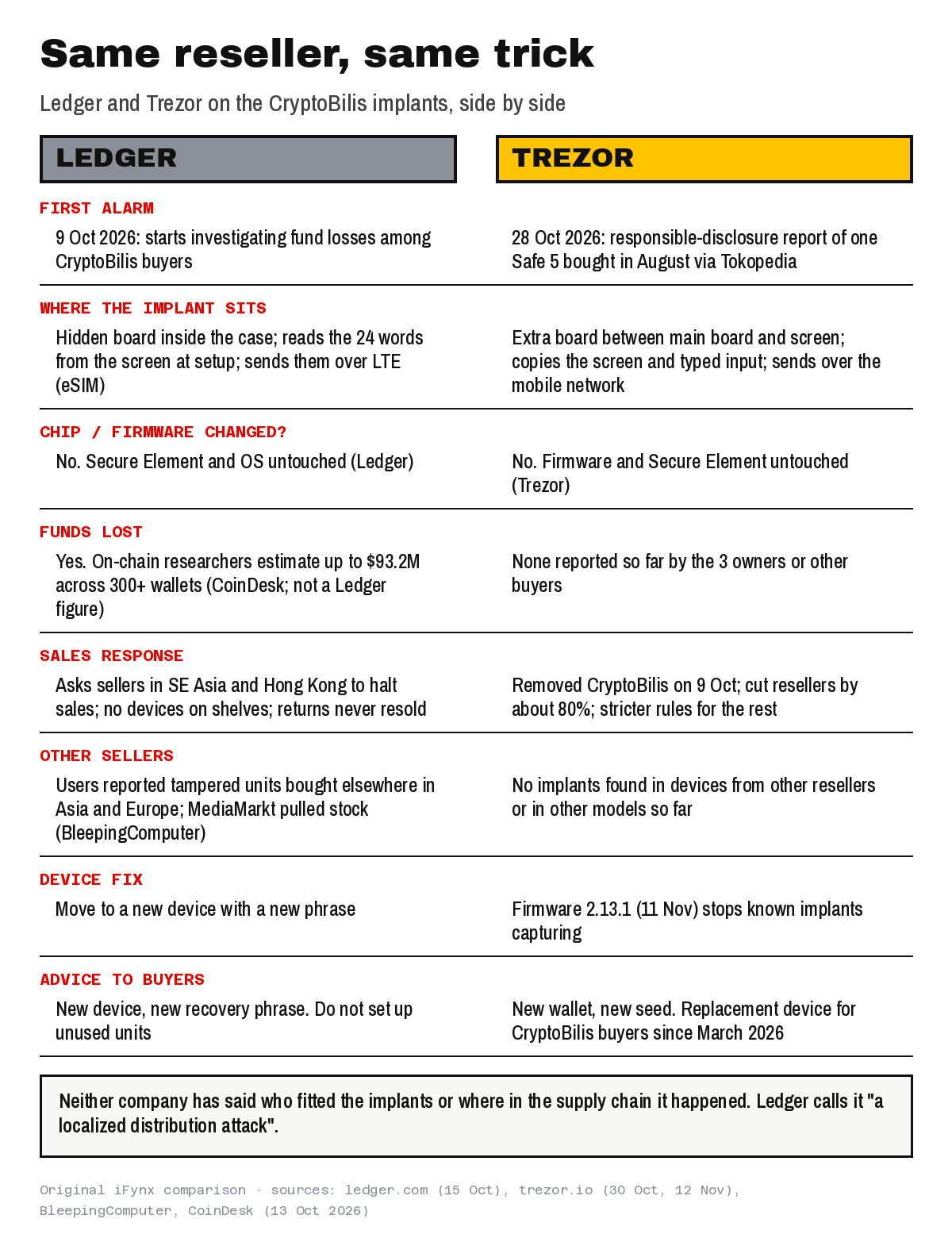
The CryptoBilis case started with Ledger, not Trezor. Ledger says a highly organised criminal group bought genuine Ledger devices, fitted hidden components to capture the recovery phrase during setup, and put them back into distribution through resellers in Southeast Asia, then drained wallets in one coordinated operation. Ledger calls it “a localized distribution attack”, stresses that its chip, operating system and servers were not compromised, and asked authorised sellers in Southeast Asia and Hong Kong to halt sales. Researchers tracking the thefts on-chain estimated losses of up to $93.2 million across more than 300 wallets, according to CoinDesk; that is a third-party estimate, not a Ledger figure.
Trezor’s three confirmed owners, by contrast, have not lost funds, and Trezor says no customer has reported a loss. Neither company has said who fitted the implants or where in the supply chain it happened. The side-by-side view below sums up what each has said.
What firmware 2.13.1 does, and what it cannot do
Trezor released firmware 2.13.1 on 11 November 2026, and its changelog lists it for the Safe 7, Safe 5 and Safe 3 among other models. The anti-implant protection is a different matter: Trezor said on X on 13 November that only the Safe 5 was affected and that the mitigation for this attack applies only to the Trezor Safe 5, because each model has a different architecture. Trezor says the update “includes a protection that stops the implants we’ve found from capturing anything on devices that run it, making the current batch of implants useless”. It has not published technical details, saying it will not share information that could help attackers.
Three limits are worth spelling out:
- It is not retroactive. In Trezor’s words, “the update can’t protect a wallet backup that was captured before it”. If your device came from CryptoBilis and you created or restored a wallet on it before updating, assume the phrase may be out.
- It covers the implants found so far, on the Safe 5. A future implant could be designed differently, and Trezor says it is still researching other options for its other devices. That is why it also tightened its reseller rules rather than relying on firmware alone.
- Update only through Trezor Suite. Never install firmware from a link in an email, a message or a “support” chat. Scammers are already using this incident to approach crypto holders.
Buying a hardware wallet in the Gulf or Egypt: a provenance checklist
Arabic searches such as «شراء محفظة باردة» and «محفظة باردة جرير» show that many buyers in our region look for cold wallets in marketplaces and big electronics chains. The store is not the problem in itself; the chain of custody is. Before you buy, and before you put any money on the device, run through these twelve points.
- Check the maker’s own reseller list on the day you buy. Trezor publishes its authorised resellers at trezor.io/resellers, and the list is shrinking after the 80% cut. If your country or store is not listed, buy directly from the maker.
- Prefer buying direct. Trezor’s own recommendation is to buy your next device from trezor.io. Trezor told users on X that it ships worldwide, but its blog also says shipping rules mean it cannot deliver every model to every country, so check delivery to the UAE, Saudi Arabia or Egypt before you order.
- On marketplaces, check the seller, not the listing. Amazon, noon and others host many sellers on one product page. The seller name is what matters, and it should match a listed authorised reseller. Trezor told a buyer on X that its official Amazon storefront is fulfilled directly by Trezor; a third-party seller on the same page is not the same thing.
- Never buy second-hand, open-box or “returned” units. Ledger now forbids its authorised sellers from reselling returned devices in any form, even if they look new and unopened. Apply the same rule to yourself.
- Be suspicious of a discount. A hardware wallet sold well below the official price by an unofficial seller is a reason to walk away, not a bargain.
- Do not accept a device as a gift or via a courier you do not control if you plan to store serious money on it. Buy it yourself.
- Do not rely on weighing, seals or opening the case. Trezor says these are not reliable tests. Provenance is the control, not inspection.
- Generate a new seed on the device, never use one that came with it. A real hardware wallet never ships with a pre-printed recovery phrase or a card asking you to type one.
- Keep firmware current through the official app. On a Trezor that means firmware 2.13.1 or later via Trezor Suite.
- Keep the receipt with the seller name. Trezor asks affected buyers to check the seller name on their receipt, and you will need it for any replacement claim.
- Test with a small amount first. Send a small transfer in and out before moving savings, and watch the address on the device screen.
- Treat “replacement” or “refund” messages as scams by default. Trezor and Ledger support will never ask for your recovery phrase. Contact support only through the official website.
If you already set up a suspect device: the safe migration order
If your device came from CryptoBilis, or you cannot prove where it came from and you hold meaningful funds, do the steps in this order. Doing them out of order, for example restoring the old phrase on a new device, does not remove the risk.
- Stop using the suspect device for anything new, and do not type any other recovery phrase into it.
- Get a clean wallet: a new hardware wallet from a trusted source, or, as Trezor suggests if none is available, a software wallet or an exchange account you already know.
- Create a brand-new seed on the clean wallet and write it down offline.
- Move all funds from the old wallet to addresses from the new seed, checking the full receiving address before each transfer.
- Keep the suspect device, do not throw it away, and contact Trezor Support through trezor.io/support to arrange the replacement.
For exchanges and wallet apps in the region
Exchanges, brokers and wallet apps in the UAE, Saudi Arabia and Egypt will get support tickets about this incident, and so will banks that now offer crypto services. A few practical steps for product and support teams:
- Add a short in-app notice on withdrawal-to-self-custody screens: “Buying a hardware wallet? Buy direct or from the maker’s authorised list, and never use a recovery phrase that came with the device.”
- Prepare a bilingual support script that never asks for, or accepts, a recovery phrase, and links only to the official Trezor and Ledger support pages.
- Watch for phishing that borrows the story. Replacement and refund lures are the obvious next scam. Warn users before it reaches them.
- Do not overreact on risk scoring. Withdrawals to hardware wallets are still a good security habit; the lesson is about provenance, not about self-custody itself.
For background, see how a login provider incident hit users in our Keplr wallet hack briefing, the withdrawal questions in our Binance hack coverage, today’s Kava Lend exploit explainer, the phone-side risk in our iOS 27.2.1 crypto-user warning, the merchant view in the BTCPay Server hack, and how scams ride on headlines in the Binance data breach claim.
How iFynx can help
iFynx · for crypto, exchange and wallet teams
Your users will ask “is my wallet safe?” Make sure your app answers first.
iFynx designs and builds fintech and wallet products for companies in the Gulf, Egypt and Palestine. After the CryptoBilis implants, we can help you turn the lessons into product:
- Design: UX/UI Design: wireframes and flows for safer self-custody: withdrawal-to-hardware-wallet warnings, “where did you buy it?” prompts, and recovery-phrase screens that never ask users to type their seed into your app.
- Software Development: Mobile App Development: ship those flows in your iOS and Android apps from one codebase, in Arabic and English.
- Maintenance & Growth: Quality Assurance: test the warning, support and scam-notice paths before a real incident does.
Frequently asked questions
What did Trezor confirm about CryptoBilis?
On 12 November 2026 Trezor confirmed that three Trezor Safe 5 devices bought from CryptoBilis between 20 August and 23 September 2026 contain a hidden extra board that copies recovery words from the screen and sends them over the mobile network. It found no implants in devices from other resellers or in other Trezor models, and no owner has reported lost funds.
Does Trezor firmware 2.13.1 fix the implant?
Partly. Trezor says firmware 2.13.1, released on 11 November 2026, stops the implants found so far from capturing anything on Trezor Safe 5 devices that run it. It cannot protect a recovery phrase captured before the update, so CryptoBilis buyers should still move funds to a new wallet with a new seed.
I bought my Trezor from CryptoBilis. What should I do?
If you bought from CryptoBilis since March 2026 and use the device, move your funds to a new wallet with a new seed; restoring the old phrase elsewhere does not help. If you have not set it up, do not use it. Keep the device and contact Trezor Support, which offers a replacement.
Can I check my own Trezor for an implant?
No reliable home test exists, according to Trezor. Weighing the device or opening it cannot confirm or rule out tampering, and the implant does not change the firmware or Secure Element. Where you bought the device is what matters; if you are unsure, contact Trezor Support.
Is it safe to buy a hardware wallet in the UAE, Saudi Arabia or Egypt?
Yes, if you control the chain of custody. Buy directly from the maker or from a seller on the maker’s authorised reseller list, avoid second-hand, open-box and heavily discounted units, create a new seed on the device, and update firmware only through the official app.
Sources and update policy
Checked on 15 November 2026 (09:05 Asia/Gaza): Trezor, Our CryptoBilis investigation: what we found and what we’ve changed, 12 November 2026 (no dated updates added at the time of checking); Trezor, Implant reported in a Trezor sold by CryptoBilis, 30 October 2026; Trezor, firmware changelog (2.13.1, 11 November 2026); Trezor on X, 13 November reply on which models the mitigation covers (latest Trezor X posts checked, no newer CryptoBilis update); Trezor authorised resellers; Ledger, Ledger’s response to the hardware implant attack, 15 October 2026; BleepingComputer, Trezor confirms crypto-stealing implants in three wallets, 13 November 2026, and Ledger asks sellers across Asia to halt sales; The Hacker News, Trezor confirms hidden implants, 13 November 2026; CoinDesk, Ledger finds covert cellular implant, 13 October 2026. Loss estimates for the Ledger case are third-party on-chain figures. This article is not financial advice. We will update it if Trezor confirms an implant outside CryptoBilis or the Safe 5, reports lost funds, or releases new protections.
Related reading
- Keplr Wallet Hack: Web3Auth Incident Hits Some Google and Apple Login Accounts — What Users Should Do Now
- Binance Hack: What We Know About the $6.3 Billion Theft, When Withdrawals Return, and What Users and Fintech Teams in the UAE, Saudi Arabia and Egypt Should Do
- Kava Lend Exploit Explained: How a Dormant BUSD Market Let an Attacker Borrow 55.2M KAVA, What Kava Has Confirmed, and the Dead-Market Checklist for DeFi and Fintech Teams