Direct answer — 14 November 2026: In its 13 November update, Cursor says its October security incident started at Fireworks AI. An access key Cursor had issued to Fireworks was, in Cursor’s words, “exposed by Fireworks”, and an attacker used it to copy data from a read-only storage bucket Cursor used to share data with Fireworks. The bucket held limited coding agent traces, mostly from 2025, from sessions not in Privacy Mode. A small number of those traces contained credentials that had not been redacted (less than 0.01% of customers had API credentials exposed). Starting from those credentials, the attacker reached some of Cursor’s SaaS tools and, on 29 October, placed malicious copies of Anthropic’s Claude Code extension (Anthropic.claude-code 2.1.312 and 2.1.313) on the cache that serves Cursor’s VS Code extension marketplace. At most 5,000 users who requested those cached versions potentially received the malicious build, which was available for about 11 hours. Cursor says Privacy Mode prompts and code, customer code repositories, its production systems and the Cursor app itself were not affected, the last attacker activity it has seen was on 1 November, and it has moved all inference off Fireworks. If you installed one of those two versions, uninstalling the extension alone may not be enough.


Cursor and Claude Code are everyday tools in many of the development teams, agencies and startups iFynx works with in the UAE, Saudi Arabia, Egypt and Palestine. This iFynx briefing explains what Cursor now says happened, what it says was and was not exposed, and what an engineering lead should check this week. We re-read Cursor’s 13 November update and its 29 October security notice at about 13:05 Asia/Gaza on 14 November and use only facts those pages state; where we rely on another source, we name it. One point of attribution matters: that the key was “exposed by Fireworks” is Cursor’s account. Fireworks’ own security bulletins page, last updated 9 November, does not mention Cursor. We do not reproduce any attack code or attacker infrastructure in this article.
Key facts (checked 14 November 2026, before publishing)
- Starting point: “An attacker obtained an access key we had issued to Fireworks. The key was exposed by Fireworks” (Cursor, 13 November). The key gave read access to a storage bucket Cursor used to share data with Fireworks.
- What was in the bucket: limited coding agent traces, mostly from 2025, from sessions not in Privacy Mode, which Cursor was permitted to use for model training.
- Credentials: a small number of traces contained unredacted credentials; less than 0.01% of customers had API credentials exposed.
- Agent traces: for users not using Privacy Mode, coding agent traces were exposed for fewer than 0.05% of users. Cursor says it notified each of them directly, and “if you did not receive a notification, your data was not in these traces.”
- What else the attacker reached through Cursor’s SaaS tools: select archived non-production source code repositories (some containing business contact information), limited customer support data and email conversations, product usage metrics and contact details, summaries of some coding agent conversations, and some credentials users had sent to Cursor’s support team.
- The malicious extension: on 29 October, using a stolen credential, the attacker placed malicious, unauthorized copies of
Anthropic.claude-code2.1.312 and 2.1.313 (Windows and macOS builds, per Cursor’s 29 October notice) directly on the cache used to serve the Cursor VS Code extension marketplace. Anthropic did not publish them, it was not a vulnerability in Anthropic’s product, and the marketplace source, Open VSX, never had the malware. - Scope and window: at most 5,000 users potentially received the malicious build; it was available for approximately 11 hours (2:27 a.m. to 1:35 p.m. Pacific Time on 29 October, which is 09:27 to 20:35 UTC).
- Containment: Cursor believes the incident is contained. The last attacker activity it has seen was on 1 November, and it was blocked. Cursor moved all inference traffic off Fireworks and deactivated the key.
- Not affected, according to Cursor: prompts and code in Privacy Mode, live traffic to Cursor, production systems, the Cursor app and its official updates (no release signing keys were exposed), other marketplace extensions, active inference requests, plugins from the Cursor Marketplace and customer code repositories.
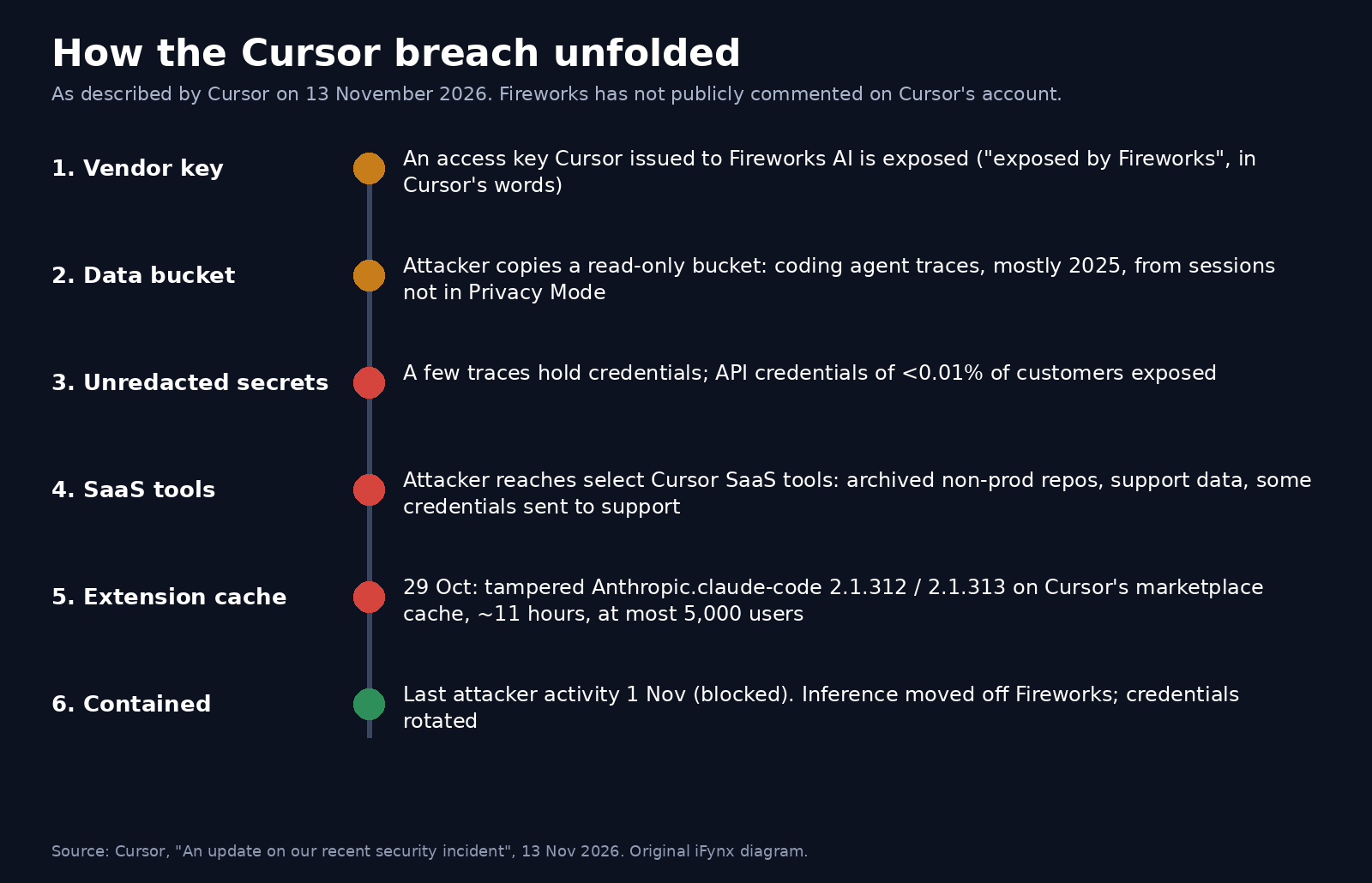
How the Cursor breach unfolded
Cursor’s 13 November post is the first time the company has connected the dots in public. On 29 October it had announced the malicious extension; two weeks later it explained how the attacker got there. The chain has five links, and every one of them is a lesson for teams that use AI tools.
1. A vendor key. Cursor shared some data with Fireworks AI, the inference and training provider, through a read-only storage bucket, and issued Fireworks an access key for it. Cursor says the key was exposed by Fireworks, and the attacker used it to copy the bucket’s contents. Fireworks has described its own October incident in two bulletins (9 October and 9 November), which we covered in our Fireworks AI breach explainer. Neither bulletin names Cursor.
2. Agent traces with secrets inside. The bucket held coding agent traces, mostly from 2025, from sessions that were not in Privacy Mode and that Cursor was permitted to use for model training. Some of those traces contained credentials that had not been redacted. That is the uncomfortable centre of this story: developers paste API keys, tokens and connection strings into agent sessions, and those sessions can end up in datasets that move between companies.
3. From credentials to SaaS tools. Starting with those credentials, the attacker reached select SaaS tools used by Cursor. From there they accessed archived non-production repositories, support data and email conversations, usage metrics, summaries of some agent conversations and some credentials users had sent to Cursor’s support team.
4. From SaaS tools to the extension cache. On 29 October, using a stolen credential from that exposed data, the attacker placed tampered copies of Anthropic’s Claude Code extension on the cache that serves Cursor’s VS Code extension marketplace. The upstream marketplace, Open VSX, was never touched.
5. Detection and containment. Cursor says its monitoring systems identified the unauthorized activity. It removed the build after about 11 hours, took the marketplace offline, worked with the cloud provider hosting the attacker’s server to take it down, deactivated the vendor’s key, rotated credentials and, as a precaution, disabled internal and product services “well beyond what the evidence required”, which temporarily disrupted some Cursor features.
What the malicious Claude Code extension did
Cursor’s 29 October security notice describes the tampered extension in detail. In short, it tried to install a persistent SSH backdoor. It collected host and user information (hostname, username, operating system, architecture, home directory path, environment variable names, working directories, configured Git email and public IP address) and sent it to the attacker. It tried to add an attacker-controlled SSH key, labelled svc-telemetry, to the user’s authorized keys, to enable the local SSH service and to open a reverse SSH tunnel, and it installed persistence so the tunnel would retry in the background.
Cursor adds two important limits. First, turning on the local SSH service needs administrator rights, which the extension did not have on most macOS and Windows machines, so on those machines that step failed “outside of highly unusual circumstances where Cursor was started with administrator privileges”. Second, the attacker’s server no longer works: Cursor and the hosting provider took it offline. Even so, Cursor tells affected users to follow its remediation steps regardless, because the extension did add the attacker’s key, install persistence and send host details, and because “the limited env-var collection does not rule out later credential access over the backdoor”.
Was I affected? A quick self-check
Most Cursor users were not. Cursor says “the vast majority of customers were not affected” and that it has contacted each affected customer directly. Use this table to decide what applies to you.
| Question | If the answer is yes | Where it comes from |
|---|---|---|
Did you install or update to Anthropic.claude-code 2.1.312 or 2.1.313 from Cursor’s VS Code extension marketplace on macOS or Windows on 29 October, between 2:27 a.m. and 1:35 p.m. PT (13:27 to 00:35 UAE time, 12:27 to 23:35 Saudi time)? |
Follow every step in Cursor’s security notice. Uninstalling alone may not be enough. | Cursor notice, 29 October |
| Did you receive an email or in-app notice from Cursor about this incident? | Do what it says. Team admins whose credentials were exposed received a list of the specific keys to rotate. | Cursor update, 13 November |
| Did you use Cursor without Privacy Mode, mostly during 2025? | You are only in the exposed traces if Cursor notified you. No notice means your data was not in them, according to Cursor. | Cursor update, 13 November |
| Did you ever send a password, token or API key to Cursor’s support team? | Rotate it now, even if you were not notified. Cursor says some credentials users sent to support were accessed. | Cursor update, 13 November |
Is uninstalling enough? What Cursor tells affected users to do
No. Cursor is explicit that “uninstalling the extension alone may not be enough”, because the payload dropped standalone persistence scripts that keep running. For anyone who installed one of the two tampered versions during the window, Cursor’s notice lists five steps, which we summarise here (use the notice itself for the exact commands and scripts):
- Run Cursor’s check to see whether the
svc-telemetrykey was added to your SSH authorized keys file. If it was, the machine is impacted. - Search endpoint, network and extension-installation telemetry for the indicators of compromise Cursor published.
- Isolate any machine that shows evidence that the payload ran or the backdoor was installed.
- Remove the unauthorized SSH key, the persistence mechanisms and any running tunnel processes, using Cursor’s remediation script for macOS or Windows, and decide whether the machine should be rebuilt.
- From a trusted system, rotate the credentials and sessions that were reachable from the affected machine: cloud keys, Git tokens, package registry tokens, database passwords and SSO sessions.
A checklist for engineering leads in the Gulf and Egypt
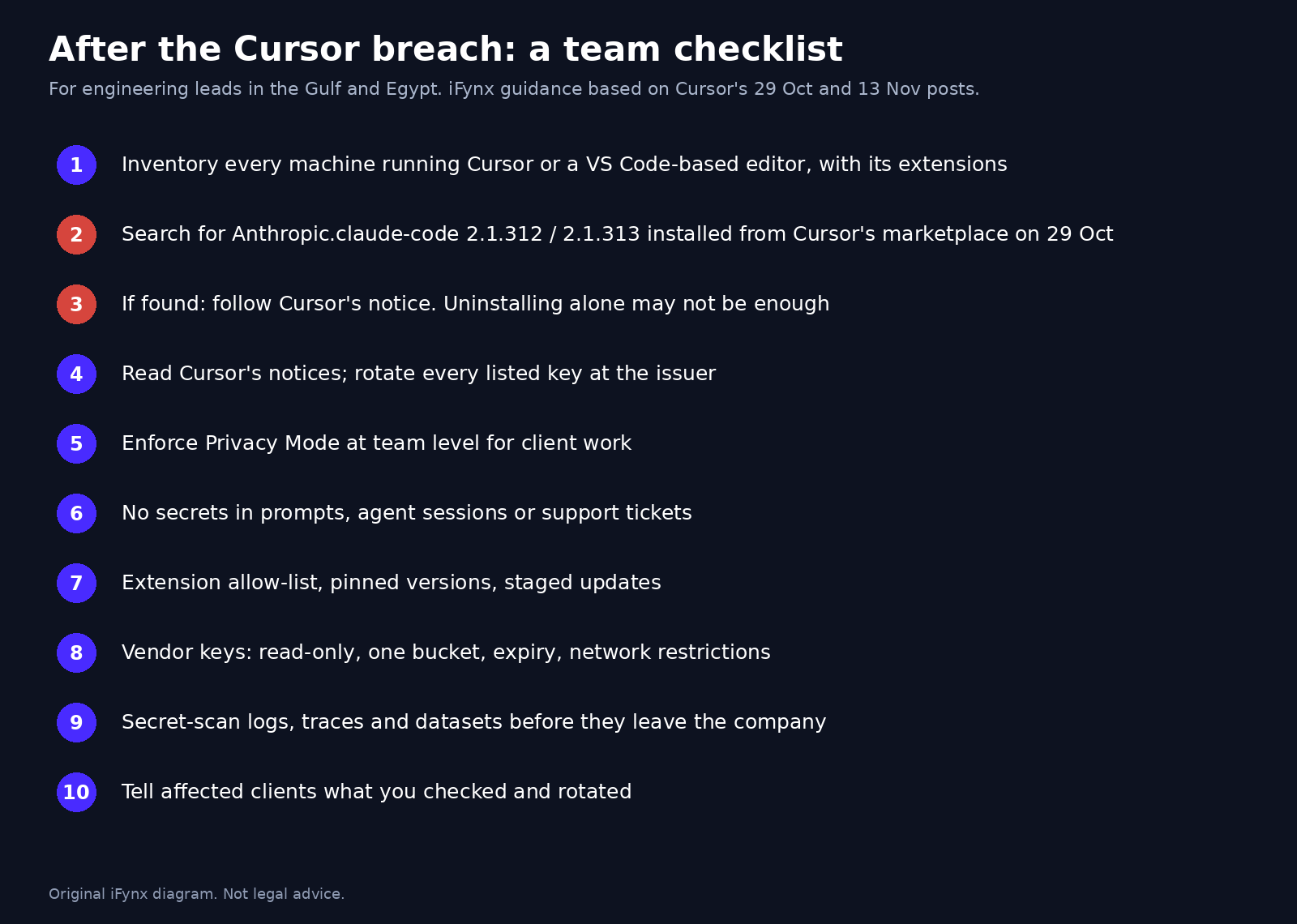
Even if no one on your team installed the bad versions, this incident is a good reason to tighten how your team uses AI coding tools. This is the checklist iFynx would run with a client team this week:
- Inventory. List every developer machine that runs Cursor, VS Code or another VS Code-based editor, and the extensions installed on each. You cannot check what you cannot see.
- Check the two versions. Search your endpoint or MDM data for
Anthropic.claude-code2.1.312 or 2.1.313 installed from Cursor’s marketplace on 29 October. If you find one, follow Cursor’s five steps above. - Read your Cursor notices. Make sure the team admin’s inbox is monitored. If Cursor sent a list of keys to rotate, rotate them at the issuer, not just by deleting them from a config file.
- Turn on Privacy Mode for client work. Cursor says Privacy Mode prompts and code were not affected. For agency and client projects, enforce it at team level rather than leaving it to each developer.
- No secrets in agent sessions. Treat every prompt, agent trace and support ticket as something that may be stored and shared. Use environment variables, a secrets manager and short-lived tokens. Our Claude Code secrets checklist covers the same mistake in config files.
- Never send credentials to support. Not to Cursor, not to any vendor. If you already did, rotate.
- Control extensions. Keep an allow-list of approved extensions and publishers, pin versions for sensitive projects, and roll out updates to a small group first. A trusted publisher name does not prove that the package you received is the one the publisher shipped.
- Scope vendor keys. Every key you give a vendor should be read-only where possible, limited to one bucket or dataset, set to expire, and restricted by network location. Cursor says it has now “expanded network access restrictions” so compromised credentials cannot be used outside their intended location; that is worth copying.
- Scan the data you share. Run secret scanning on logs, traces and datasets before they leave your company, not only on code repositories. Cursor says it has added this too.
- Plan the client conversation. If client credentials or client code could have been on an affected machine, tell the client what you checked and what you rotated, and check your contract and data protection duties.
Why vendor keys and agent traces are the real lesson
It is tempting to read this as an extension-marketplace story, and the tampered extension is the part that reached developers’ machines. But the root cause, as Cursor describes it, is more ordinary: a key given to a vendor, a bucket of historical agent traces, and credentials sitting unredacted inside those traces. Each of those is a normal engineering decision. Put together, they gave an attacker a path from a third party’s environment into Cursor’s own tools.
We have seen the same pattern across recent incidents. In the GitBook breach, API and integration tokens stored by a documentation platform were the prize. In the Mittwald MCP server case, AI-assistant connectors became an attack surface. And in the Grok Build exposure, AI-built apps were left open to anyone. The common thread is that AI tooling creates new places where secrets and code live: prompts, traces, connectors, training datasets and vendor buckets. Most security programmes still only scan the Git repository.
For teams in the Gulf and Egypt, where many companies use AI coding tools through a small number of global vendors, the practical question is simple: if one of your vendors’ vendors leaks a key, what would an attacker find? If the honest answer includes production credentials or client data, fix that first.
What Cursor changed after the incident
Cursor lists these measures in its 13 November update:
- Moved all inference traffic off Fireworks, deactivated the key it had issued to Fireworks and cut off Fireworks’ access to all datasets it had shared.
- Rotated every exposed credential it found, highest risk first, and as a precaution rotated all credentials in use across its internal systems.
- Validated that all other marketplace extensions were authentic, and reviewed and rebuilt its VS Code extension marketplace.
- Expanded network access restrictions across its service providers, where possible.
- Added secret scanning and protections across all its code repositories and expanded scanning to other internal data sources.
- Redeployed all production infrastructure and services as a precaution, and reviewed every internal service before restoring it.
- Engaged external forensics experts and contacted everyone affected.
Cursor says it ships the Cursor app from a separate code hosting system that the attacker never accessed, and that no release signing keys were exposed. It also says the incident did not affect its other products, including Cloud Agents for customer teams.
What this means for client data in the UAE, Saudi Arabia and Egypt
If your team builds software for clients, an incident at a tool vendor can still become your problem. Ask three questions. Was any client credential, client code or client personal data on a machine that ran the tampered extension? Was any client secret ever pasted into a Cursor session without Privacy Mode, or sent to Cursor’s support? Did Cursor notify you? If all three answers are no, document that you checked, and move on to the checklist above. If any answer is yes, rotate first, then review your obligations under the data protection law that applies to the data (the UAE’s Federal Decree-Law No. 45 of 2021, Saudi Arabia’s Personal Data Protection Law or Egypt’s Law No. 151 of 2020) and under your client contracts. This is iFynx guidance, not legal advice.
How iFynx can help
Keep your AI-assisted development fast and safe.
iFynx designs, builds and maintains web and mobile products for companies in the Gulf, Egypt and Palestine. After incidents like this one, we help teams lock down the tooling without slowing the work:
- Maintenance & Growth: Software Maintenance and Quality Assurance: credential rotation, secret scanning across repositories and logs, extension and dependency audits, and monitoring of the systems we maintain for you.
- Software Development: API & Backend Engineering and Web Development: secure CI/CD, short-lived and scoped keys for every vendor, and a written AI-tool policy for your projects.
Contact us for a free 30-minute review of your team’s AI coding tool setup and secrets hygiene.
Frequently asked questions
Was I affected by the Cursor security breach?
Probably not. Cursor says the vast majority of customers were not affected and that it contacted every affected customer directly. You need to act if you installed or updated to Anthropic.claude-code 2.1.312 or 2.1.313 from Cursor’s VS Code extension marketplace on macOS or Windows on 29 October, if Cursor sent you a notice, or if you ever sent credentials to Cursor’s support team.
Is uninstalling the malicious Claude Code extension enough?
No. Cursor says uninstalling the extension alone may not be enough, because the payload installed persistence scripts that keep running. Follow Cursor’s security notice: check for the svc-telemetry SSH key, isolate the machine if it is impacted, remove the key, persistence and tunnel processes with Cursor’s script, consider a rebuild, and rotate credentials from a trusted system.
Was my code or Privacy Mode data exposed?
According to Cursor, no. Prompts and code in Privacy Mode, customer code repositories, live traffic and production systems were not affected. Agent traces were exposed for fewer than 0.05 percent of users who were not using Privacy Mode, and Cursor says it notified each of them. If you were not notified, your data was not in those traces.
Is Claude Code itself vulnerable?
No. Cursor says Anthropic did not publish the malicious copy, that this was not a vulnerability in Anthropic’s product, and that the marketplace source, Open VSX, never had the malware. The attacker placed tampered copies on the cache behind Cursor’s own extension marketplace. Other extensions in that marketplace were validated as authentic.
What did Fireworks AI have to do with it?
Cursor says the attack started with an access key Cursor had issued to Fireworks, which Cursor says was exposed by Fireworks. The attacker used it to copy a read-only data bucket shared with Fireworks. That is Cursor’s account; Fireworks’ public bulletins about its own October incident do not mention Cursor. Cursor has since moved all inference off Fireworks.
Sources and update policy
Read on 14 November 2026 (about 13:05 Asia/Gaza): Cursor, “An update on our recent security incident”, 13 November 2026; Cursor, “Security notice — malicious version of Anthropic.claude-code (2.1.312 and 2.1.313) identified in the Cursor VS Code Extension Marketplace”, 29 October 2026, updated 30 October; Fireworks AI, security bulletins, last updated 9 November 2026. Earlier iFynx coverage: Fireworks AI data breach. All figures in this article are Cursor’s own and have not been independently verified. iFynx did not analyse the malicious extension. The checklists are iFynx guidance, not legal advice. We will update this article if Cursor, Fireworks or Anthropic publishes new information.
Related reading
- Claude Code Secrets on GitHub: What Apiiro Found in settings.local.json — A Rotate-First Checklist
- MCP Server Security After the Mittwald Breach: What Happened, Why AI-Assistant Connectors Are Now an Attack Surface, and a Lock-Down Checklist for Gulf and Egypt Teams
- GitBook Breach by AI Agents: What Was Exposed (Git Sync Secrets, API and Integration Tokens, Assistant Questions), What to Rotate Now, and a Docs-Platform Security Checklist for Gulf and Egypt Crypto, Fintech and SaaS Teams
- FBI ARTEX Warning (FLASH-20261113-001): What the FBI Says About the AI Agent Hacking Tool, Its Mitigations, and a 10-Step Checklist for Gulf and Egypt Banks, Fintechs and SaaS Teams
- wfx-loot GitHub Actions Malware: How Hijacked Accounts Stole CI Secrets From Thousands of Repositories, and the CI/CD Secret Checklist for Gulf and Egypt Teams