Direct answer — 10 November 2026: Microsoft’s November 2026 Patch Tuesday fixes one Outlook zero-day that attackers are already using: CVE-2026-124194, a Microsoft Outlook spoofing flaw rated Moderate, CVSS 6.5, and marked “Exploitation Detected” in the Microsoft Security Update Guide. If a user opens a specially crafted message file, Outlook can connect to an attacker-controlled network location without its usual external-content warning, which discloses the user’s NTLMv2 hash. Microsoft says the attacker could use that to authenticate as the user. The Preview Pane is not an attack vector. Affected: Microsoft 365 Apps for Enterprise, Office LTSC 2021 and Office LTSC 2024. CISA added it to its Known Exploited Vulnerabilities catalog on 10 November with a due date of 24 November 2026. Update Office first, then work through the critical server fixes below.

This iFynx briefing is for IT, security and engineering teams in Saudi Arabia, the UAE, Egypt and the wider region that run the usual hybrid mix: Outlook on every desk, Microsoft 365 in the cloud, and Exchange, Active Directory, DNS and DHCP still on premises. We read Microsoft’s own advisories, the CISA catalog entry and Microsoft’s update pages on 10 November 2026, shortly before publishing. Where a number comes from a researcher or a news site rather than Microsoft, we name the source. We give no attack steps and link to no exploit code.
Key facts (checked 10 November 2026, before publishing)
- Zero-day: CVE-2026-124194, “Microsoft Outlook Spoofing Vulnerability” (CWE-356, the product UI does not warn of an unsafe action). Severity Moderate, CVSS 6.5. Exploited: yes. Publicly disclosed: no.
- Impact: a crafted message file, opened by the user, leaks the user’s NTLMv2 hash. User interaction is required; the Preview Pane is not a vector. Microsoft has not described the attacks it saw.
- Fixed builds: Office LTSC 2024 16.0.17932.21140; Office LTSC 2021 16.0.14334.21048; Microsoft 365 Apps for Enterprise per Microsoft’s Office security release notes.
- CISA KEV: added 10 November 2026, due 24 November 2026 (a US federal deadline).
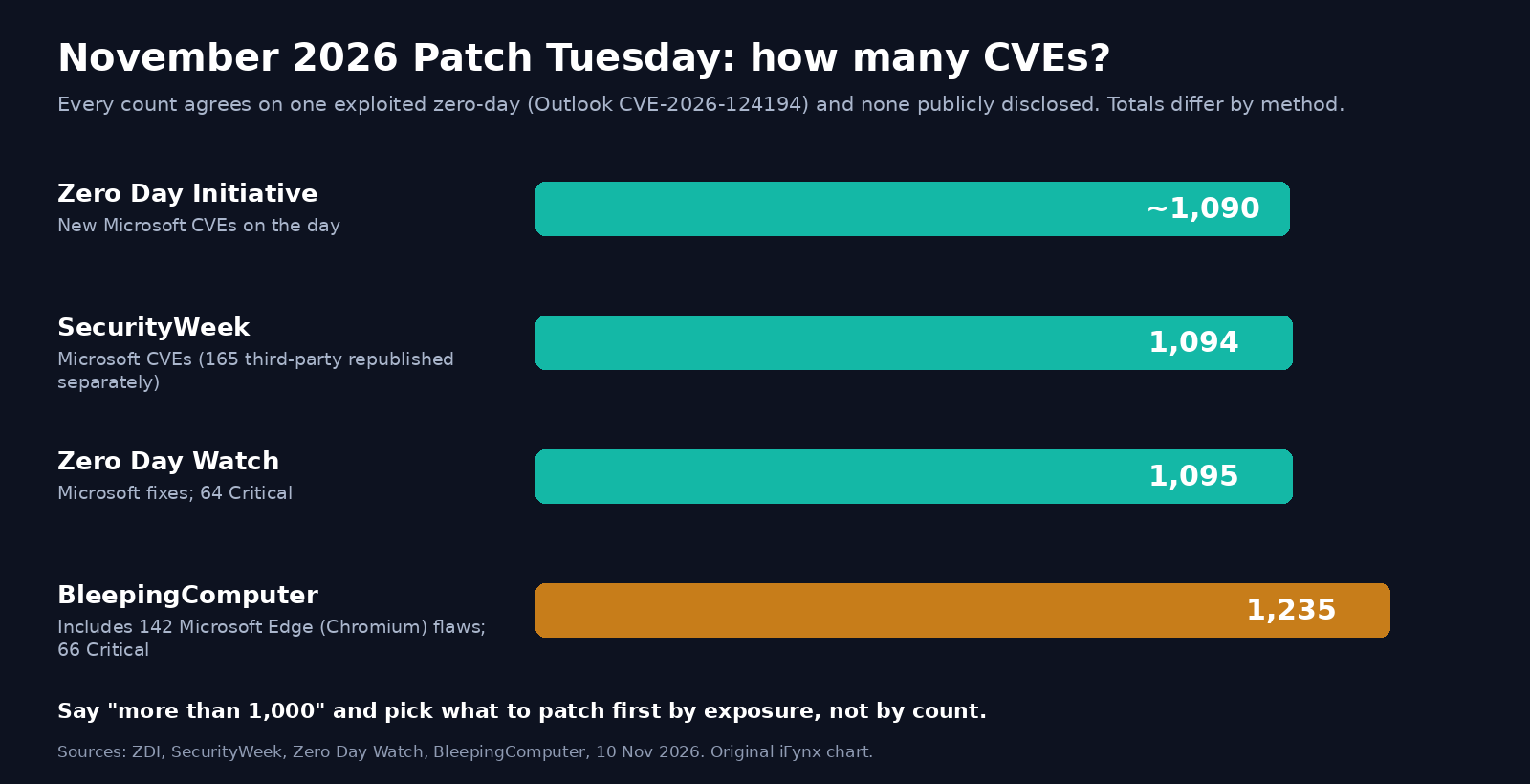
- Size of the release: “more than 1,000” CVEs. Counts differ by source: about 1,090 (ZDI), 1,094 (SecurityWeek), 1,095 (Zero Day Watch), 1,235 including 142 Microsoft Edge (Chromium) flaws (BleepingComputer).
- Patch next: Windows Search RCE CVE-2026-116928 (9.8, zero-click via Exchange indexing), LDAP RCE CVE-2026-119958 (9.8), Schannel RCE CVE-2026-119952 (8.1, “Exploitation More Likely”), Exchange Server RCE CVE-2026-118207 (8.8).
- Windows 11: KB5132061 (24H2/25H2/26H2) and KB5131087 (23H2, the last update for 23H2 Enterprise and Education).
What is the Outlook zero-day CVE-2026-124194?
Microsoft calls CVE-2026-124194 a spoofing vulnerability, but the practical risk is credential theft. In the advisory’s own words, an unauthenticated attacker “could send a specially crafted message file and convince a user to open it in an affected version of Microsoft Outlook. Opening the file could cause Outlook to connect to an attacker-controlled network location without displaying the usual external-content warning, potentially disclosing authentication information that could be used to impersonate the user.” The CVSS section adds that “this vulnerability discloses a user’s NTLMv2 hash to the attacker who could use this to authenticate as the user.”
Three details matter for how worried you should be:
- It needs a click. The CVSS vector has user interaction required (UI:R): the user has to open the malicious file. Microsoft’s FAQ says plainly that the Preview Pane is not an attack vector, so simply seeing the email in the reading pane does not trigger it.
- The score understates the business risk. Moderate and 6.5 look low next to this month’s 9.8s, but the bug is the only one Microsoft lists as exploited, and a stolen NTLMv2 hash can be cracked offline or relayed to other services that still accept NTLM. Dustin Childs of the Zero Day Initiative put it simply: “don’t let the score lull you.”
- There are no public attack details. SecurityWeek notes that Microsoft’s advisory “provides no information about the observed attacks.” Microsoft credits a researcher using the name “nono” and Benoît Sevens. We will update this article if Microsoft or a reputable researcher publishes indicators.
This is the same family of problem as earlier Outlook NTLM leaks: a file makes the client reach out to a remote share and authenticate automatically. The fix closes this specific path. The longer-term defence is to make NTLM hashes worth less on your network, which is the checklist further down.
Which Outlook and Office versions are affected, and how to update
Microsoft lists six affected products, all rated Moderate. The table shows the build Microsoft gives as fixed:
| Product (32-bit and 64-bit) | Fixed in | How it usually updates |
|---|---|---|
| Microsoft 365 Apps for Enterprise | Per Microsoft’s Office security release notes for your update channel | Click-to-Run channel, Intune or Configuration Manager |
| Office LTSC 2024 | 16.0.17932.21140 | Click-to-Run volume licence, Configuration Manager or WSUS |
| Office LTSC 2021 | 16.0.14334.21048 | Click-to-Run volume licence, Configuration Manager or WSUS |
For one PC: open Outlook, choose File, then Office Account, then Update Options, then Update Now, and restart Outlook. For a fleet, push the update through Intune or Configuration Manager and then check the installed build on a sample of machines, especially laptops that were off the network on Tuesday evening. If your users are on a slow channel such as Semi-Annual Enterprise, confirm the channel has a November security build before you report “patched”.
Not on Microsoft’s affected list for this CVE: Outlook on the web, Outlook for Mac and the mobile apps. Microsoft lists only the Windows Office products above, so treat Windows desktop Outlook as the priority.
November 2026 Patch Tuesday: the numbers, and why sources disagree
Microsoft released its November security updates on Tuesday 10 November 2026, the second Tuesday of the month. Every tracker agrees on the headline: one exploited zero-day (the Outlook bug above), no publicly disclosed zero-days, and a very large release. They do not agree on the total, because they count different things:
| Source | Count | What it includes |
|---|---|---|
| Zero Day Initiative | About 1,090 new CVEs | New Microsoft CVEs released on the day; 30 judged wormable |
| SecurityWeek | 1,094 | Microsoft CVEs; a further 165 third-party CVEs republished separately |
| Zero Day Watch | 1,095 | Microsoft fixes; 64 rated Critical |
| BleepingComputer | 1,235 | Includes 142 Microsoft Edge (Chromium-based) flaws; 66 Critical |
So the honest answer is “more than 1,000”. The number itself matters less than the fact that only a handful of bugs need emergency treatment, and you should pick those by exposure, not by count. SecurityWeek reports that Windows accounts for 726 of the flaws, Office for 174, SQL Server for 59 and Exchange Server for nine, and that the month follows October’s record of 1,413.
The other November patches to prioritise
These are the bugs we would put straight after the Outlook fix. None is marked exploited or publicly disclosed by Microsoft today. Severity, scores and exploitability ratings come from each CVE’s page in the Security Update Guide.
| CVE | What it is | Microsoft rating | Why it matters in a hybrid estate |
|---|---|---|---|
| CVE-2026-116928 | Windows Search remote code execution | Critical, 9.8, “Exploitation Less Likely” | Microsoft’s FAQ says an attacker can send an email with a crafted attachment that Exchange Server processes automatically for indexing; the recipient does not open anything. The fix ships in the November Windows updates for every supported Windows and Windows Server version. |
| CVE-2026-119958 | Windows LDAP remote code execution | Critical, 9.8, “Exploitation Less Likely” | Unauthenticated, crafted LDAP calls, code runs in the LDAP service. That makes domain controllers the obvious target. |
| CVE-2026-119952 | Windows Schannel remote code execution | Critical, 8.1, “Exploitation More Likely” | Crafted packets to a service using Schannel (TLS). Attack complexity is high, but Microsoft rates exploitation more likely. |
| CVE-2026-118207 | Exchange Server remote code execution | Critical, 8.8, “Exploitation More Likely” | Needs a low-privileged authenticated user. Fixed for Exchange Server Subscription Edition in KB5133453 (build 15.02.2562.057). |
| CVE-2026-119990 | Azure OpenAI elevation of privilege | Critical, 9.8 | No action for you. Early write-ups said the advisory asked for customer action without saying what. Microsoft revised the entry on 10 November: the flaw “has already been fully mitigated by Microsoft” and there is “no action for users of this service to take”. |
Beyond those five, ZDI counts 30 CVEs this month that fit its definition of wormable (network, no authentication, no user interaction), including five in Message Queuing (MSMQ), four in DNS, two in DHCP Server, and one each in LDAP, Schannel, IIS, RPC Runtime and Exchange-reachable Windows Search. If you run MSMQ, DNS or DHCP on Windows Server, those servers belong in the first week.
Adobe, the same day. Adobe published nine bulletins covering 110 CVEs. The two that matter for most businesses are Adobe Connect APSB26-191 (24 CVEs, top CVSS 10.0, priority 2) and Adobe Experience Manager APSB26-189 (14 CVEs, top CVSS 9.9, priority 2). Adobe says it is not aware of exploitation, according to ZDI and SecurityWeek’s summaries. Gulf universities, training providers and government entities that host Adobe Connect for webinars should schedule it this week.
Which Windows update is November’s?
The Windows fixes for CVE-2026-116928, CVE-2026-119958 and CVE-2026-119952 all come in the normal monthly cumulative update. These are the KBs and builds Microsoft lists:
| Windows version | November 2026 update | Build after install |
|---|---|---|
| Windows 11 24H2, 25H2, 26H2 | KB5132061 (Microsoft also lists KB5132043) | 26100.9974 / 26200.9974 / 26300.9974 |
| Windows 11 23H2 | KB5131087 | 22631.7711 |
| Windows 11 26H1 | KB5132059 | 28000.3501 |
| Windows Server 2025 | KB5131080 (hotpatch: KB5131077) | 26100.33822 |
| Windows Server 2022 | KB5131090 | 20348.5870 |
| Windows Server 2019 / Windows 10 1809 | KB5131085 | 17763.9487 |
| Windows Server 2016 / Windows 10 1607 | KB5131291 | 14393.9688 |
| Windows 10 21H2 and 22H2 | KB5131096 | 19044.7846 / 19045.7846 |
One lifecycle warning from Microsoft’s KB5131087 page: Windows 11 version 23H2 Enterprise and Education have reached end of updates, and the November 2026 update is the last one for those editions. If part of your fleet is still on 23H2 Enterprise, plan the move to a supported version now, because next month’s fixes will not reach those PCs.
Patch order for a hybrid Exchange, Microsoft 365 and Active Directory estate
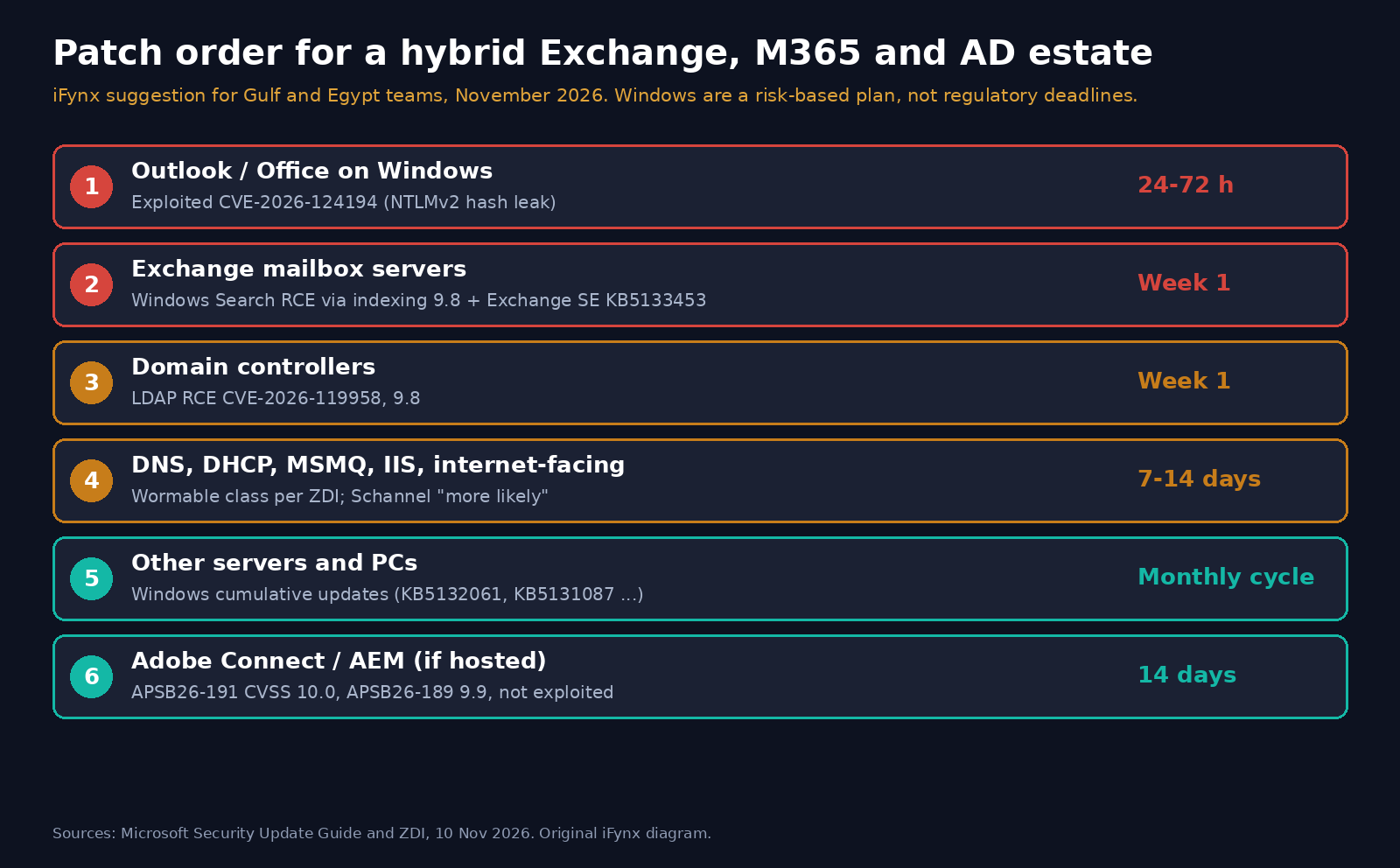
Most banks, government entities and large companies we work with in the Gulf and Egypt have some version of the same estate. Here is the order we would use this month. The time windows are iFynx suggestions for a risk-based plan, not regulatory deadlines; adjust them to your own approved SLAs and change process.
| Order | What | Why first | Suggested window |
|---|---|---|---|
| 1 | Outlook / Office on Windows desktops (Microsoft 365 Apps, LTSC 2021/2024) | The only exploited bug; every user is a target | 24–72 hours, starting with executives, finance, HR and IT admins |
| 2 | Exchange Server mailbox servers (November Windows CU plus Exchange SE KB5133453) | Zero-click Windows Search RCE via indexing; Exchange RCE “more likely” | Within the first week, after a quick test on one DAG member |
| 3 | Domain controllers | LDAP RCE 9.8; a compromised DC is a compromised company | Within the first week, staged one site at a time |
| 4 | DNS, DHCP, MSMQ, IIS and any internet-facing Windows server | Wormable class bugs per ZDI; Schannel “more likely” | Within 7–14 days |
| 5 | Remaining servers and workstations (Windows cumulative updates) | The long tail of the 1,000+ CVEs | Normal monthly cycle |
| 6 | Adobe Connect and AEM, where you host them | CVSS 10.0 and 9.9, not exploited | Within 14 days |
Two practical notes. First, if you still run Exchange Server 2016 or 2019, look closely at what Microsoft offers you: this month’s Exchange RCE lists only Exchange Server Subscription Edition as affected and fixed. An out-of-support Exchange server is exactly the kind of obsolete software that the CBUAE Rulebook (Article 8, below) asks regulated firms to plan away from, whatever Patch Tuesday says. Second, for exposed servers you cannot patch this week, reduce exposure first (restrict who can reach LDAP, SMB and MSMQ ports, and put Exchange behind your reverse proxy and email security gateway), and record that compensating control.
NTLM hardening checklist after the Outlook zero-day
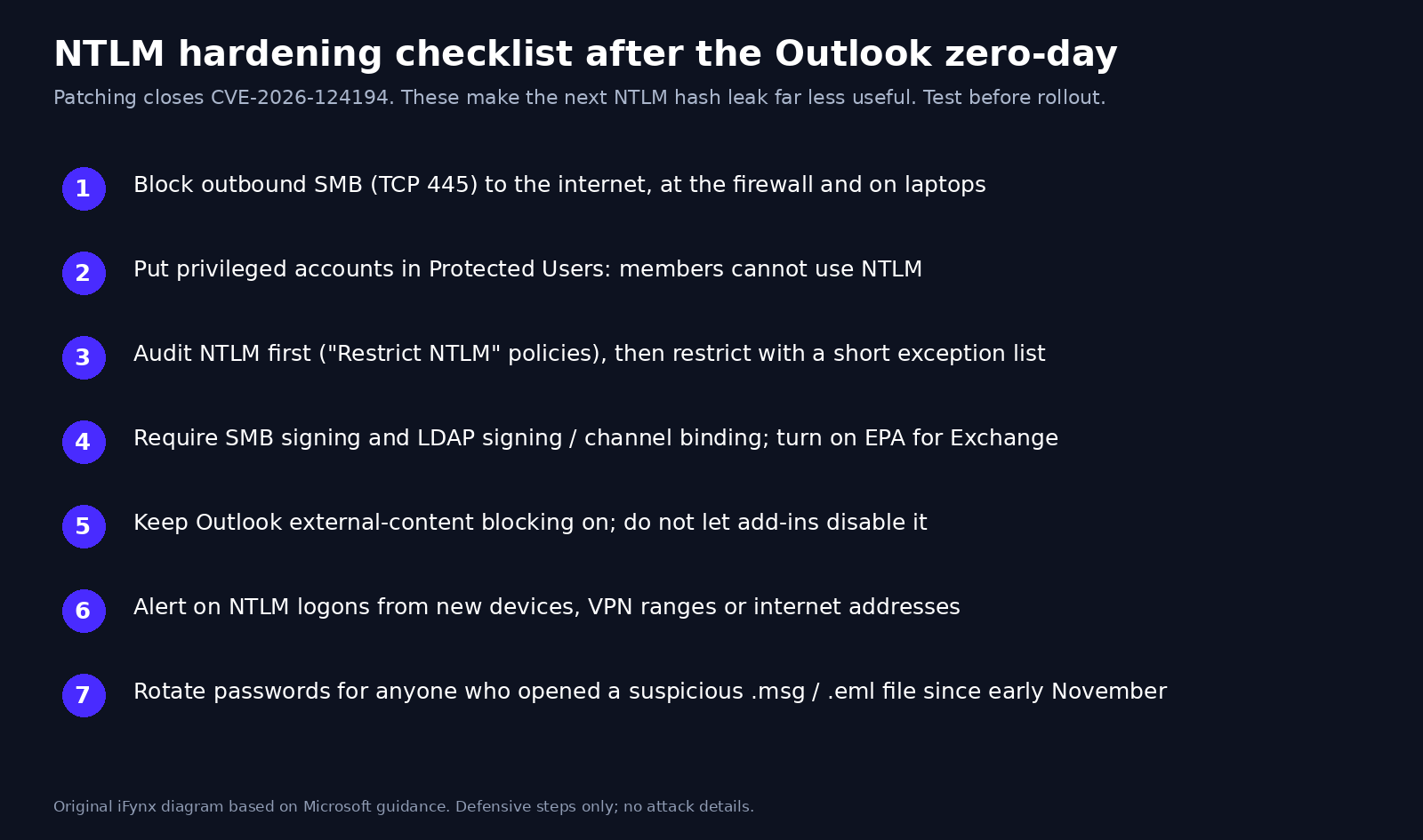
Patching closes CVE-2026-124194. These steps make the next NTLM leak, from Outlook or anything else, much less useful to an attacker. Test each one before rolling it out; NTLM is still used by old printers, scanners and line-of-business apps.
- Block outbound SMB (TCP 445) to the internet at the perimeter firewall and on laptops through Windows Firewall policy. A hash leak needs the client to reach an attacker’s server; this cuts the most common path.
- Put privileged accounts in the Protected Users group. Members cannot authenticate with NTLM, so a leaked hash for a domain admin is far less useful. Start with Tier 0 admins and test service accounts separately.
- Turn on NTLM auditing first, then restrict. Use the “Network security: Restrict NTLM” policies in audit mode on clients and domain controllers to see who still uses NTLM, then block outgoing NTLM to remote servers with a short exception list.
- Require SMB signing and LDAP signing/channel binding on servers and domain controllers, and turn on Extended Protection for Authentication on Exchange. These make relay attacks much harder.
- Keep Outlook’s external-content blocking on (the default) and do not let users or add-ins switch it off by policy.
- Watch for NTLM logons from unusual places. Alert on NTLM authentication to your servers from new workstations, VPN ranges or internet addresses, and on outbound SMB attempts in firewall logs.
- Rotate passwords for anyone who reports opening a suspicious message file since early November, starting with privileged and finance users, and check their sign-in history.
Saudi, UAE and Egypt: what the regulators’ patch rules actually say
No Gulf regulator we checked sets a single “patch within X days” number for everyone. What they do require is a documented, risk-based process with defined timelines, and evidence that you follow it. That is exactly what an exploited zero-day tests.
- Saudi Arabia, SAMA. The SAMA Cyber Security Framework (control 3.3.17, Vulnerability Management) requires a process that includes “defined timelines to mitigate (per classification)” and “patch management and method of deployment”. SAMA’s rulebook section 3.4.9 Patch Management requires patches to be assessed for impact, tested in a separate environment and deployed through formal change management.
- Saudi Arabia, NCA. The Essential Cybersecurity Controls ECC-2:2024 list “patch management for systems, applications, and devices” (2-3-3-3) and, under vulnerability management, remediation “based on their classification and the associated cyber risks”, with fixes verified in a non-production environment first (2-10-3).
- UAE, Central Bank. The CBUAE Rulebook, Article 12 says patch procedures should cover identification, categorisation, prioritisation and installation, and that “the implementation timeframe for each category of security patches should be defined based on severity and impact on systems”. Article 8 adds a duty to plan the “timely renewal or discontinuation of obsolete and unsupported hardware and software”, which is relevant to Windows 11 23H2 Enterprise and older Exchange servers.
- Egypt. We did not find a public patch timeline from the Financial Regulatory Authority to quote. Check the instructions that apply to your licence, and your Central Bank of Egypt requirements if you are a bank or payment provider.
A practical way to use this: record CVE-2026-124194 in your vulnerability register as “exploited, vendor fix available”, apply your fastest category, and keep the evidence (deployment report, sample build checks, exceptions with compensating controls). CISA’s 24 November due date applies to US federal agencies, but it is a useful outside benchmark when an auditor asks whether two weeks was reasonable.
Arabic phishing awareness: .msg attachments and what to tell staff
The Outlook bug needs a user to open a file, so a short, calm message to staff is worth sending today, in Arabic and English. Avoid technical detail; people only need to know what to do. A sample you can adapt:
Short staff notice (Arabic and English): «تنبيه أمني: لا تفتح ملفات رسائل البريد المرفقة (بامتداد .msg أو .eml) التي تصلك من جهات غير متوقعة، حتى لو بدت من زميل أو بنك أو جهة حكومية. إذا فتحت ملفاً كهذا منذ بداية نوفمبر، أبلغ فريق تقنية المعلومات فوراً. حدّث برنامج Outlook عند ظهور التنبيه.» / “Security notice: do not open attached email files (.msg or .eml) you were not expecting, even if they seem to come from a colleague, a bank or a government body. If you opened one since early November, tell IT now. Update Outlook when prompted.”
Lures in the region often borrow trusted names: a ZATCA or tax notice, a ministry circular, a bank statement, a shipping or customs message, or an HR salary file near month-end. Should you run a phishing simulation this week? We would send the notice first and patch, and only run a simulation later, with a harmless template, so that the test measures habits rather than catching people with a live exploit theme. If your email gateway can, quarantine inbound .msg and .eml attachments from external senders for a few days while Outlook updates roll out.
For broader context, the same week brought other patch-now items we covered: the Chrome zero-day CVE-2026-125350, the OpenSSH SSHole vulnerability on CISA’s list, the APT vulnerability CVE-2026-109518 for Debian and Ubuntu, the Brotli vulnerability in Node.js and .NET, and MCP server security for AI-assistant connectors.
How iFynx can help
iFynx keeps business software patched, monitored and working for companies in the Gulf, Egypt and Palestine, in Arabic and English. Through Software Maintenance in our Maintenance & Growth service, we take on monthly patch cycles like this one: inventory, a risk-based patch order, staged rollout, build verification and the evidence pack your auditors ask for. Our Quality Assurance team tests your own apps and integrations against each update before it reaches production, so a Windows or Exchange fix does not break a critical workflow. If you build products that talk to Microsoft 365, Exchange or Microsoft Graph, our API & Backend Engineering team, part of Software Development, can move them off legacy NTLM and basic authentication to modern, token-based sign-in. Contact us for a free 30-minute call with your current patch status and we will suggest a first-week plan.
Frequently asked questions
Is the Outlook zero-day being exploited?
Yes. Microsoft marks CVE-2026-124194 as exploited (“Exploitation Detected”) in its Security Update Guide, and CISA added it to the Known Exploited Vulnerabilities catalog on 10 November 2026 with a due date of 24 November. Microsoft has not published details of the attacks. It was not publicly disclosed before the fix.
Which Outlook and Office versions are affected, and how do I update?
Microsoft lists Microsoft 365 Apps for Enterprise, Office LTSC 2021 and Office LTSC 2024, in 32-bit and 64-bit. The fixed builds are 16.0.17932.21140 for LTSC 2024 and 16.0.14334.21048 for LTSC 2021; Microsoft 365 Apps get the fix in each channel’s November security build. On one PC, use File, Office Account, Update Options, Update Now in Outlook. Fleets should push the update via Intune or Configuration Manager and verify the build.
Does the Outlook Preview Pane trigger CVE-2026-124194?
No. Microsoft’s advisory says the Preview Pane is not an attack vector. The user has to open a specially crafted message file. That is why a short staff warning about unexpected .msg and .eml attachments helps while the update rolls out.
How do I stop NTLM hash leaks like this one?
Block outbound SMB on TCP port 445 to the internet, add privileged accounts to the Protected Users group so they cannot use NTLM, audit NTLM use and then restrict it, require SMB and LDAP signing, and alert on unusual NTLM logons. Patching closes this bug; those controls make the next leak far less useful.
Which Windows 11 update is November 2026’s Patch Tuesday?
KB5132061 for Windows 11 versions 24H2, 25H2 and 26H2 (builds 26100.9974, 26200.9974 and 26300.9974) and KB5131087 for version 23H2 (build 22631.7711). Microsoft says this is the last update for Windows 11 23H2 Enterprise and Education. The Outlook fix itself comes through Office updates, not Windows Update.
Sources and update policy
Read on 10 November 2026: Microsoft Security Update Guide entries for CVE-2026-124194, CVE-2026-116928, CVE-2026-119958, CVE-2026-119952, CVE-2026-118207 and CVE-2026-119990 (including affected products and fixed builds); CISA Known Exploited Vulnerabilities catalog (catalog version 2026.11.10); Microsoft Support pages for KB5132061 and KB5131087; Zero Day Initiative, November 2026 Security Update Review; SecurityWeek; BleepingComputer; Zero Day Watch; SAMA, NCA and CBUAE rulebooks as linked above. Adobe’s APSB26-191 bulletin page was not yet reachable when we checked, so Adobe figures are as reported by ZDI and SecurityWeek. Patch windows in this article are iFynx suggestions, not regulatory deadlines. We will update this article if Microsoft revises the advisory, publishes attack details, or a fix causes known issues.
Related reading
- Chrome zero-day CVE-2026-125350: update Chrome now (157.0.8103.50) — what Gulf and Egypt teams should do
- OpenSSH SSHole (CVE-2026-123158): CISA Says It Is Exploited, Who Is Affected (Alpine, Docker, OpenWrt) and How to Patch by Nov 12
- APT Vulnerability CVE-2026-109518: Debian and Ubuntu Fixed apt Versions, How to Update apt First, and a Mirror and Proxy Checklist for Gulf and Egypt Servers
- MCP Server Security After the Mittwald Breach: What Happened, Why AI-Assistant Connectors Are Now an Attack Surface, and a Lock-Down Checklist for Gulf and Egypt Teams
- Across Protocol Hack: How a Registrar Social-Engineering Attack Turned across.to Into a Wallet Drainer, and the Domain Hijacking Checklist Gulf and Egypt Crypto Apps Need
- N-able N-central Vulnerability (Able2Shell): 33 Exploits, Emergency Hotfix 2026.4.1.26 and the RMM Security Checklist for Gulf and Egypt Companies