Direct answer — 10 November 2026: Update your iPhone to iOS 27.2.1 (or iOS 26.7.3 if you stay on iOS 26) today, delete any app you did not install from the App Store, and check for unknown profiles. worse_query is an iOS sandbox escape: a public proof-of-concept released on 8 November shows that a malicious app can read files belonging to other apps. Binance and SlowMist warned on 10 November that seed phrases, private keys and login data stored by wallet apps could be exposed. Apple released iOS 27.2.1 on 9 November, but Apple’s security notes do not name worse_query, so Apple has not said whether iOS 27.2.1 fixes it. The attack needs a malicious app already on your phone, and we found no public report of stolen funds or an App Store app abusing it as of publication.

This iFynx briefing is written for iPhone users and product teams in the Gulf and Egypt. It is built only from primary sources read on 10 November 2026: Apple’s iOS 27.2.1 security notes and security-releases page, the official Binance and SlowMist posts on X, and the researcher’s own project description. We do not link to the proof-of-concept code and we do not describe how the bug works step by step. Where sources disagree, for example on which iOS versions are affected, we show each claim with its source.
Key facts (checked 10 November 2026, before publishing)
- What: worse_query, a sandbox escape in iOS that lets a malicious app read (and, per SlowMist, modify) other apps’ local files. It is not a jailbreak.
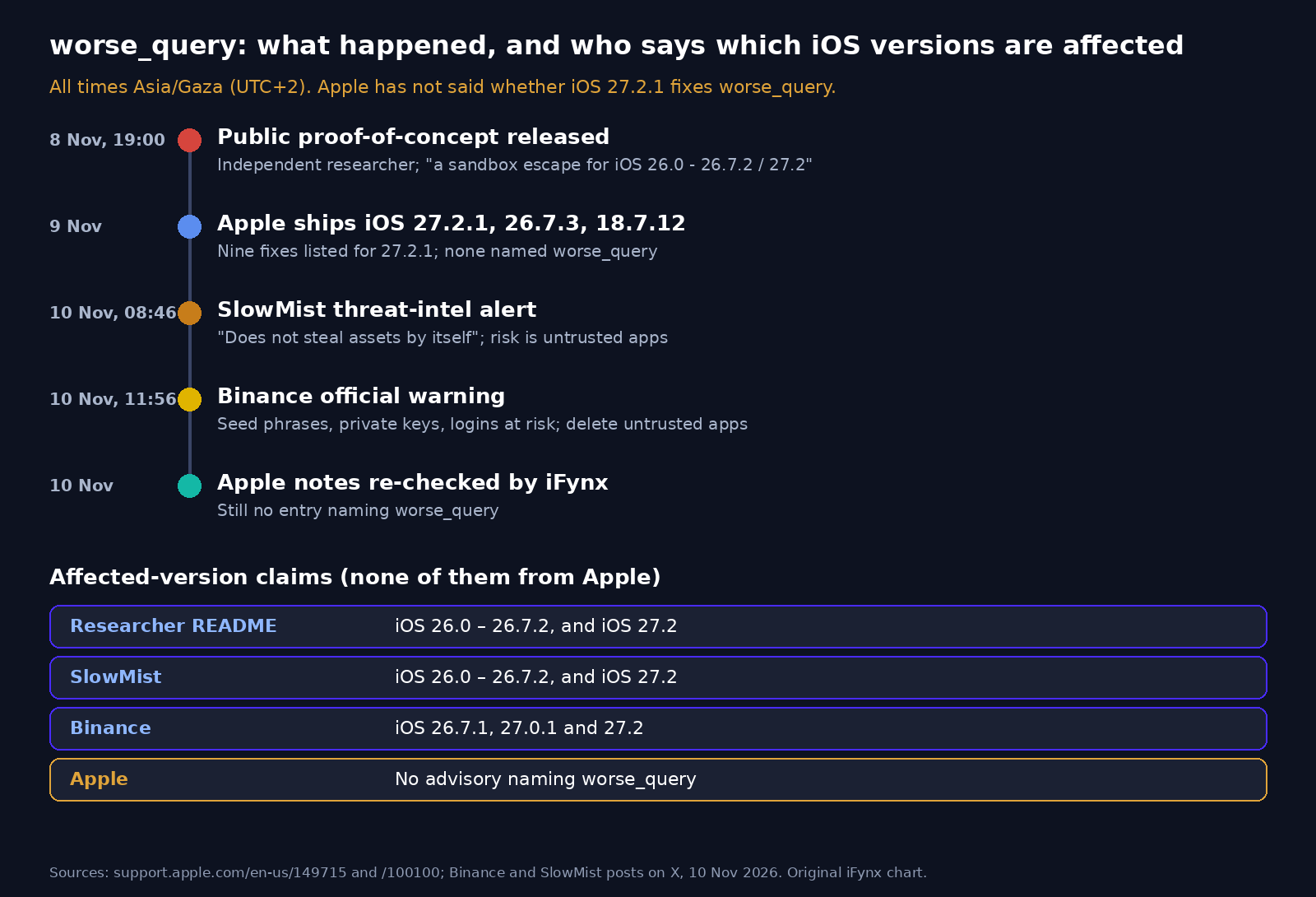
- Disclosed: a public proof-of-concept was released on 8 November 2026 (19:00 Asia/Gaza) by an independent researcher.
- Affected versions, per the project page: iOS 26.0 to 26.7.2 and iOS 27.2. Per Binance: iOS 26.7.1, 27.0.1 and 27.2.
- Apple: released iOS 27.2.1, iOS 26.7.3 and iOS 18.7.12 on 9 November. The iOS 27.2.1 notes list nine fixes and do not name worse_query.
- Warnings: SlowMist (10 Nov, 08:46 Asia/Gaza) and Binance (10 Nov, 11:56 Asia/Gaza) told crypto users to delete untrusted apps and update.
- Precondition: a malicious app must be installed and running on the device, typically a sideloaded, enterprise-signed or developer-signed app.
- In the wild: no confirmed theft and no App Store abuse reported publicly as of publication.
What is worse_query, and what can it do?
Every iPhone app runs inside its own “sandbox”: a private container of files that other apps are not supposed to see. That separation is why a game cannot normally read your banking app’s data. worse_query breaks that assumption. The researcher’s project page describes it as “a sandbox escape for iOS 26.0 – 26.7.2 / 27.2”, says it is the direct successor to an earlier bug called bad_query, and lists the folders it can reach: other apps’ data containers, shared App Group containers and some system folders. The page also says it is “a proof-of-concept for developers”, that an app must be set up with an App Group container to use it, and that it “is not relevant to a jailbreak”.
In plain terms: if a malicious app gets onto your iPhone and runs, it may be able to read files that other apps saved locally. SlowMist’s alert adds that a successful exploit can “read or modify other apps’ data”, and stresses that “the bug does not steal assets by itself”. The danger depends on two things: whether you install an untrusted app, and whether your wallet or exchange app keeps sensitive data, such as a seed phrase, a keystore file or a WebView cache, in readable local files.
The researcher said on X that he had held the bug since August, that other people had found it independently, and that he published it after Apple was slow to respond. Within a day, hobbyist “tweak” tools that change hidden device settings had already started using it. That shows how easy the public code is to reuse, which is exactly why the security warnings followed.
Which iOS versions are affected? Two claims, attributed
The sources do not agree on the exact range, and none of them is Apple:
| Source | Affected versions it names | Published |
|---|---|---|
| Researcher’s project page (README) | iOS 26.0 to 26.7.2, and iOS 27.2 | 8 November 2026 |
| SlowMist threat-intelligence alert | iOS 26.0 to 26.7.2, and iOS 27.2 | 10 November 2026, 08:46 Asia/Gaza |
| Binance official warning | iOS 26.7.1, 27.0.1 and 27.2 | 10 November 2026, 11:56 Asia/Gaza |
| Apple | Has not published an advisory naming worse_query | — |
Both claims cover iOS 27.2 and the iOS 26.7 line, which is where most iPhone 11 and newer devices sat before this week’s updates. The practical advice does not change with the version list: move to the newest release Apple offers your device and remove untrusted apps.
Does iOS 27.2.1 fix worse_query? What Apple’s notes actually say
Apple released iOS 27.2.1 and iPadOS 27.2.1 on 9 November 2026 for iPhone 11 and later, alongside iOS 26.7.3 for people who stay on iOS 26 and iOS 18.7.12 for iPhone XS and XR. We read the iOS 27.2.1 security notes again just before publishing. They list nine fixes:
| Component | What Apple says the bug could do | CVE |
|---|---|---|
| AirPlay, CoreUtils (2), rapportd | Bypass the rate limit on pairing codes, or pair a Bluetooth device without user interaction | CVE-2026-113968, -113965, -113964, -113969 |
| App Intents | “An app may be able to access sensitive user data” | CVE-2026-113963 |
| Bluetooth | Corrupt process memory from Bluetooth range | CVE-2026-113970 |
| Messages (2) | Join an iMessage group chat, or read messages sent before you joined | CVE-2026-113961, -113960 |
| brotli | Memory corruption from crafted input | CVE-2026-111497 |
None of these entries is named worse_query. The App Intents fix is also about an app reaching sensitive data, but Apple describes it as an authorization issue in App Intents and does not link it to worse_query, so we cannot treat it as the same bug. Some websites and automated news summaries say iOS 27.2.1 “patches” worse_query. We could not confirm that from Apple or from the researcher, so Apple has not said whether iOS 27.2.1 fixes worse_query. We will update this article if Apple adds an entry or the researcher confirms the patch status.
Update anyway. iOS 27.2.1 fixes nine other confirmed bugs, including two Bluetooth pairing problems that matter in busy places like malls, metro stations and airports. It is also the build any future worse_query fix will start from. Note that Apple says iOS updates cannot be downgraded after installation. The brotli fix is the same library bug we covered for servers in our Brotli vulnerability guide. Apple’s notes show it reached iPhones, Macs, Apple Watch and Vision Pro in the same 9 November release.
Why Binance and SlowMist are warning crypto users now
Crypto wallets are an obvious target for any bug that reads other apps’ files, because whoever has the seed phrase or private key controls the funds. Binance’s warning, posted on 10 November at 11:56 Asia/Gaza, says worse_query “allows malicious apps to read local files from other apps, putting seed phrases, private keys, and login credentials at risk across the entire ecosystem. This is an iOS-level issue, not unique to Binance.” It tells users to delete apps from untrusted sources, update iOS and all apps, and, if they suspect a breach, move funds to a new wallet created on a clean device and reset all active login sessions.
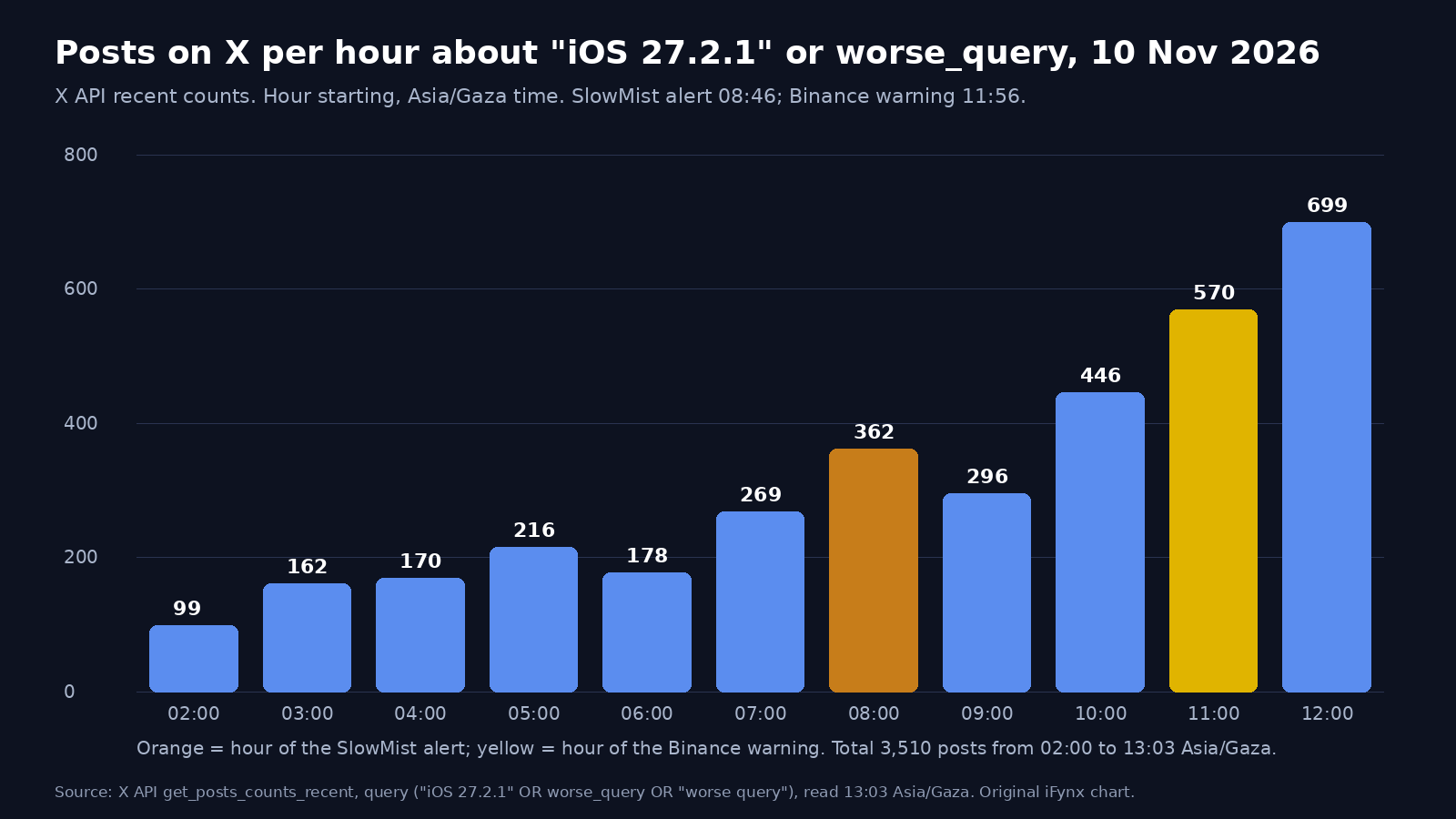
SlowMist’s alert, three hours earlier, makes the same point from the developer side: “If a wallet stores its seed phrase, keystore or WebView cache in plaintext locally, a malicious app could read it.” Interest is climbing fast. Posts on X mentioning iOS 27.2.1 or worse_query rose from 99 in the first hour of 10 November (UTC) to 699 between 12:00 and 13:00 Asia/Gaza, and Binance’s post passed 220,000 views within about an hour. Arabic-language posts about an iPhone vulnerability, iOS 27.2.1 or worse_query went from 6 to 17 a day earlier in the week to 81 on 9 November.
If you hold an exchange account, this is also a reminder to check the protections we covered after the Binance hack and the Binance data-breach claim: a withdrawal whitelist, passkeys or app-based 2FA instead of SMS, and an anti-phishing code.
How to update your iPhone to iOS 27.2.1
Apple’s update guide takes a few minutes:
- Back up the iPhone to iCloud or a computer, plug it into power and join Wi-Fi.
- Open Settings > General > Software Update. The current version and any available update are shown.
- Tap Download and Install for iOS 27.2.1. If you prefer to stay on iOS 26, choose iOS 26.7.3. iPhone XS and XR users get iOS 18.7.12.
- After the restart, confirm the version in Settings > General > About > iOS Version.
- Turn on Automatic Updates (Settings > General > Software Update > Automatic Updates), including security responses.
- Update every wallet, exchange and banking app from the App Store as well.
If the update does not appear, turn off any VPN or proxy, which Apple says can block the update servers, and try again. The full Arabic steps are in the Arabic version of this article.
Wallet-safety checklist for Gulf and Egypt iPhone users
This checklist is for anyone in the UAE, Saudi Arabia, Qatar, Kuwait, Bahrain, Oman, Egypt or elsewhere who keeps crypto, exchange accounts or banking apps on an iPhone:
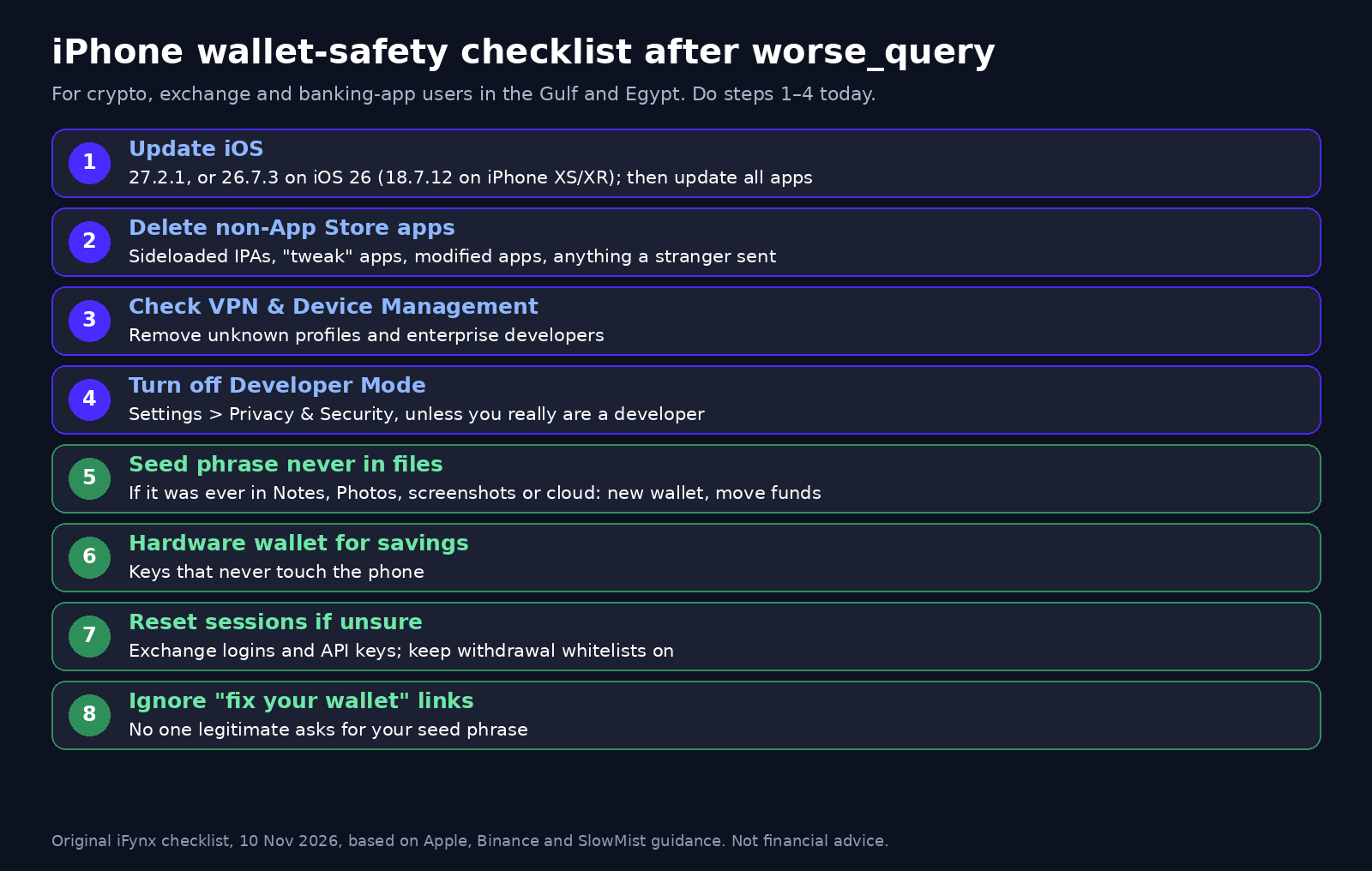
- Update first: iOS 27.2.1 or iOS 26.7.3 (iOS 18.7.12 on older models), then update your apps.
- Delete what you did not get from the App Store: sideloaded IPAs, “tweak” or “customisation” apps, modified versions of popular apps, and anything a stranger sent you.
- Check profiles and enterprise apps: open Settings > General > VPN & Device Management. Remove any profile or enterprise developer you do not recognise. A work-managed phone should only show your employer’s profile.
- Turn off Developer Mode if you are not a developer (Settings > Privacy & Security > Developer Mode). Apple requires it to run developer-signed builds.
- Seed phrases never live in files: if your seed phrase was ever stored in Notes, Photos, screenshots, a text file or cloud storage, treat it as exposed. Create a new wallet and move the funds, worse_query or not.
- Large balances belong on a hardware wallet, whose keys never touch the phone.
- Do not rush to move funds otherwise: if you only installed App Store apps and your seed is not in a file, updating and cleaning up is enough for now. If you did install an untrusted app, follow Binance’s advice: create a new wallet on a clean device, move the funds, and sign out of all sessions.
- Reset exchange sessions and API keys if you are unsure, and keep withdrawal whitelists on.
- Ignore “fix your wallet” links: scammers follow every big warning. Binance and Apple will never ask for your seed phrase.
The same advice we gave after the Keplr wallet hack applies: separate your “spending” wallet from your savings, and never import a savings seed into a phone app. People who face targeted threats should also read our guide to Apple threat notifications and Lockdown Mode.
For product teams: App Groups, enterprise builds and key storage
If you build wallet, fintech, banking or super-app products for the Gulf and Egypt, worse_query is a design review, not just a patch note. Do this without waiting for Apple to confirm a fix:
- Audit App Group entitlements. List every App Group your app and its extensions share, and what lives in each shared container. Widgets and share extensions often end up holding tokens, cached account data or logs.
- No secrets in files. Seed phrases, private keys, refresh tokens and session cookies should never sit in plain files, SQLite databases, UserDefaults, logs or WebView storage, whether in your own container or a shared one.
- Use the Keychain and the Secure Enclave. Store secrets in Keychain Services with a “this device only” accessibility class. Where you can, generate signing keys inside the Secure Enclave, so the private key cannot be exported at all. The folders the worse_query project page lists are app and group containers; the Keychain is not among them.
- Encrypt local databases with a key held in the Keychain, and keep a short lifetime on cached tokens.
- Gate risky actions by OS version. Show an in-app banner, in Arabic and English, asking users below iOS 27.2.1 or 26.7.3 to update, and consider extra checks before large withdrawals from outdated devices.
- Inventory enterprise and developer-signed builds. Internal tools, QA builds and pilot apps signed outside the App Store are exactly the kind of software this bug needs. Retire old builds, limit who can install them, and never ship them to customers.
- Push the update through MDM. For company iPhones, use your MDM to enforce iOS 27.2.1 or 26.7.3 by a deadline and block unknown enterprise profiles.
- Do not lean on jailbreak detection. This is not a jailbreak, so checks for jailbreak files will not catch it.
Treat this as part of a wider patch rhythm. This week also brought an actively exploited Chrome zero-day. If you are already preparing builds for new devices, our iPhone Duo checklist covers the Arabic RTL side of the same release cycle.
How iFynx can help
iFynx builds and maintains iOS and Android apps for fintech, wallet and consumer products, with Arabic and English from day one. Our Mobile App Development team can review how your app stores keys and tokens, move secrets into the Keychain and Secure Enclave, and audit App Group and extension data. Through Software Maintenance we handle security patches, dependency updates and OS-release readiness, so your app is tested and your users are prompted to update when Apple ships a fix. The first step is a free 30-minute discovery call: contact us with your app and the iOS versions your users run.
Frequently asked questions
Does iOS 27.2.1 fix worse_query?
Apple has not said. Apple’s iOS 27.2.1 security notes, published on 9 November 2026, list nine fixes, including AirPlay, Bluetooth, Messages and brotli, but none is named worse_query. Some websites claim it is patched, but we could not confirm that from Apple or the researcher. Install iOS 27.2.1 anyway, because it fixes other confirmed bugs and is the base for any later fix.
Which iOS versions are affected by worse_query?
The researcher’s project page and SlowMist say iOS 26.0 to 26.7.2 and iOS 27.2. Binance’s warning names iOS 26.7.1, 27.0.1 and 27.2. Apple has not published its own list. The safe step is the same either way: install iOS 27.2.1, or iOS 26.7.3 if you stay on iOS 26.
Is my crypto wallet on iPhone safe from worse_query?
The bug needs a malicious app already installed and running on your iPhone, usually a sideloaded, enterprise-signed or developer-signed app. As of 10 November 2026 we found no public report of stolen funds or of an App Store app abusing it. If you only use App Store apps, keep iOS updated and your seed phrase out of files, your risk is low.
Should I move my funds or change my seed phrase?
Only if you installed an app from outside the App Store, saw an unknown profile, or ever stored your seed phrase in Notes, photos, screenshots or cloud files. In those cases, follow Binance’s advice: create a new wallet on a clean, updated device, move the funds, and reset your exchange sessions. Otherwise, update iOS and your apps first.
What should companies with enterprise-signed iOS apps or App Groups do?
Audit every App Group and extension for stored secrets, move keys and tokens into the Keychain or Secure Enclave, encrypt local databases, and retire old enterprise or developer-signed builds. Use your MDM to enforce iOS 27.2.1 or 26.7.3 on company iPhones, and show an in-app update prompt to customers on older versions.
Sources and update policy
Read on 10 November 2026: Apple, About the security content of iOS 27.2.1 and iPadOS 27.2.1 (published 9 November 2026, re-checked before publishing); Apple, iOS 26.7.3 notes; Apple, iOS 18.7.12 notes; Apple security releases; Apple, Update your iPhone or iPad; Binance on X, 10 November 2026; SlowMist on X, 10 November 2026; Apple developer documentation on App Groups, Keychain Services, the Secure Enclave and Developer Mode. The researcher’s project description was read for the version range and scope only. We deliberately do not link to proof-of-concept code. X post counts come from the X API (recent counts, 10 November 2026). We will update this article when Apple publishes an advisory naming worse_query, when the researcher confirms the patch status, or if theft using this bug is confirmed.
Related reading
- Apple Threat Notification: Germany Warns MPs and Ministers of Mercenary Spyware on iPhones. How to Tell a Real Alert From a Scam, and a Lockdown Mode Guide for the Gulf, Egypt and Palestine
- Keplr Wallet Hack: Web3Auth Incident Hits Some Google and Apple Login Accounts — What Users Should Do Now
- Binance Data Breach Claim: What ShinyHunters Says, Why Binance Calls It a Scam, and What Gulf and Egypt Users Should Do Now
- Across Protocol Hack: How a Registrar Social-Engineering Attack Turned across.to Into a Wallet Drainer, and the Domain Hijacking Checklist Gulf and Egypt Crypto Apps Need